 A while back a friend of mine text me these instructions on how to get more than 11 pages of apps on my iPhone. I now have 13 thanks to the hack so here’s the guide.
 From what I see, there is no jailbreak required to do this.
1. Create 11 pages of apps by dragging apps to all pages. There can be blank spots.
2. Fill the first page & last page full of apps.
3. Drag the Voice Memos app to the very last page and last location in the bottom right. (Not on the dock)
4. Move one app up from the dock so the Voice Memos app gets bumped off. Hit the home button so they stop wiggling.
5. Hold down power button and turn off. Turn back on.
That’s it! When iPhone boots up it should create a new page. It seems the best amount is 19 pages. That way you can still see all the dots :) I’ve also heard that it doesn’t work on older firmware. I’m using 3.1.2.
ScreenShot
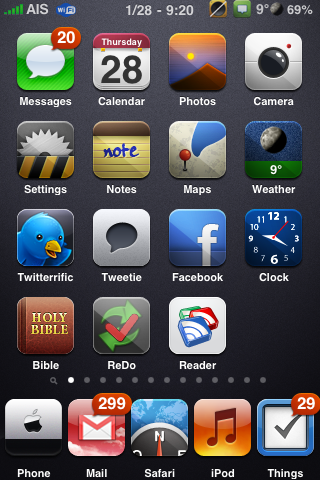
Update: I’ve updated the instructions for #2. I added that you need the first page to be full of apps also.

 Loading...


 Loading ...
which theme is it, in the ScreenShot?
It doesn’t work. Only momentarily creates an extra page which disappears soon.
thanks for the tip.
What theme do you use?
Smoog.
I love this theme, and the icons are just pretty.
What are the Cydia store files I need to download?
Smoog, but some icons are custom.
Will the additional pages stay after synchronisation?
yes
Nice, and works!
Thank you to share, this was a great hint!
I noticed that it created the empty page with the Voice Notes as the second page…with just the Voice Notes app.
What is that thing called on top? It shows like the messages app but very tiny in the status bar. And also no battery picture but just the percent.
The message icon is from either StatusNotifier or Notifier, both available in Cydia. Notifier works better on firmware 3.x. To get only the battery % you will need to install BatteryControl from Cydia.
I currently have 21 pages of apps. I have way too many apps. :) I hope the pages stay after app sync. Was going to jailbreak to sort with folders & categories. Will wait for now.
Ok, this trick totally works for me. They retain during a power down/restart and also during a basic sync. I find 17 pages to look the best, imho, the spotlight lines up with the first app and the dots are nicely spaced out dead center. One caveat, during the sync if I add or delete apps the page order reverts back to 11 pages. Easy enough to bring the page count back up, but it is time consuming albeit worth it once done. Thanks for posting this!
Just wanted to update to mention that I’ve noticed if I add apps through the iphone’s app store the extra pages stay put. It’s only when I add apps from itunes itself that it reverts. That’s a great distinction and I haven’t had to worry about it since. Also they retained when updating to 3.1.3. Hope this helps if anyone was nervous, this is a great trick! Thanks again.
There is a way to add apps in iTunes without loosing the extra pages. NEVER EVER click on the application tab of the iphone within iTunes. this way you can purchase apps and still add them. You can even click on the sync button as long as you never click on the Applications tab. I have done this repeatedly and now have 34 home screens. Most are full and the others are mostly. Hope this helps.
question is.. How do i sync apps w/o going to the tab?
is there any app to manage the icons on pc like itunes but for 11+ home screens?
YEAH… IF YOU FOLLOW HIS INSTRUCTIONS IT WORKS… THANKS!
It works BUT you’ll have to do this after every sync. Too much hassle for me!!
Not true for me. I just synced and I still have my pages. I just don’t allow it to change my icons and pages.
Douglas is right BUT only under the condition you don’t add or delete apps in iTunes. If you you do that it will revert back to 11 pages.
Hi can i create with this way without jailbreak a five icon dock too, like the screenshot?
Greetings from germany
Did you get an answer on this? I am interested in the 5 icon dock. I know how to do the more than 11 and I have 35 or so. I love that.
I would like to have the 5 icons at bottom. PLease let me know if you got an answer, Thanks,
Kathy
SUPER TRICK! Thanks so much!
I now have 19 screens.
iTunes shows screens 12+ to be “grey” but you can still arrange icons and pages within iTunes. Everything is fine, and this is a good workaround until Apple decides how to better arrange apps on the iPhone. I have over 260 apps installed, and probably after I clean up the mess I’ll want another few hundred that have been unchecked in iTunes (but still stored, I paid for many of these and just keep em because I bought em).
I hope Apple is paying attention to this issue. If they want me to buy more and more apps, they gotta give us a way to organize and find apps. Spotlight works, but only if you can remember the name, and iPhone apps are notorious for goofy names you’ll never remember again.
Thanks again!
Oh man i did the trick, it works, i got a 12th page, but i got an issue i cannot synch other new apps in it to fill the empty app holes, and in iTunes the pages “app” are appeared full, they are actually empty in my iphone…so weird…dont know how to solve that… :(
i am having the same prob…my 2nd pg has one app so its pointless having 12 pgs when one is empty, loool, although the 2nd pg shows as full on itunes on pc!??
My apps disappear how do
I get them back
Didn’t work for my iPod Touch 3g :(
u made me loose my safari
i lst voice memos n safari both…loox lyk restorin’ iz d only option…!!!
I did it once and it worked, but the second time I ltried it bumpde my apps off and now I can’t find them because the page Is hidden pls help
I found a way to make this “permanent” in another thread. If you never click on the Applications tab in the iPhone portion of iTunes you will not loose the extra pages. You can download new apps as you wish, but always sync from the main tab. I currently have 34 home screens and have added apps with 20 home screens without loosing any extra pages. If you sync from within the Applications tab, all extra screens will be lost.
Dont try it !!!!!! U will lose ur main icons , i tried it exactly it didnt work , i have 3gs 32 gb ver 3.1.3
bofawzi iz true…i lost ma SAFARI & VOICE MEMOS…..
now i’ll’ve 2 reSTOre… :| :[
DONT TRY DIS…!!!!
m sry….
bofawzi….
turn off ur ipod by holdin’ d home n power button…restart…it’ll magiKally appeard :)
there is no solution , u have to restore like i did ;(
yo thnks for the info it works great i wuz wonderin wat to do wit the extrea info and now i kno
I deleted the voice memos app. Is there any other way?
Please just click the Apps page in iTunes on your computer and do a normal sync if you have a problem.
This does not work on iOS 4.2.1
Does this work on the ipod 64g ans if it does do you habe to jave every page full for this to work
Hi Ive got iphone 3gs 32gb 4.3.3, Ive tried the trick but every time I restart the phone the voice memos comes back to the very first page, bottom right corner.Ive tried it with different downloaded applications but they dont appear after restarting the phone.I reset my iphone, i ve also emptied all the docks even the one on the main page, same thing. I dont know what should i do, so if you guys could give me a hint of what else should I try. Thanks
it dose not work
can anybody give another idea?