I just ran across this really great tool…it allows you to view the folder and files on your iPhone/iPod Touch using an application on your computer called iPhoneBrowser (sorry Mac users, it is PC only). The nice thing about this application is that it is easier to set up than SSH and your iPhone doesn’t even need to be jailbroke in order to use it! Though, if your iPhone is not jailbroke, you will not be able to see many of the folders because Apple restricts the access. If you would like to learn more about jailbreaking your iPhone, please see our Jailbreak page.
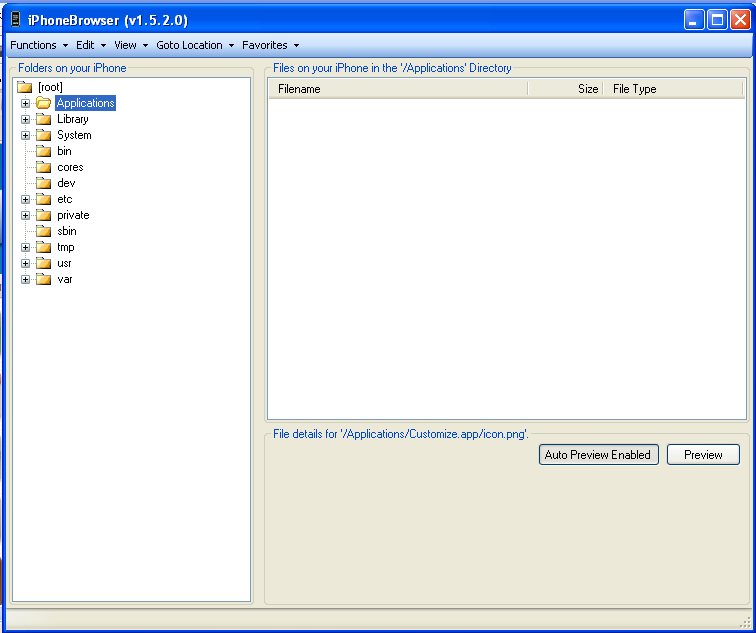
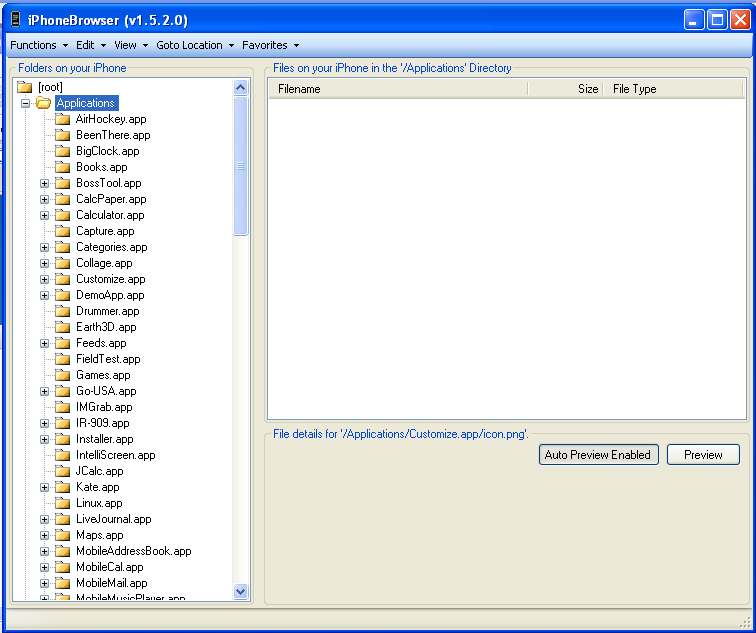
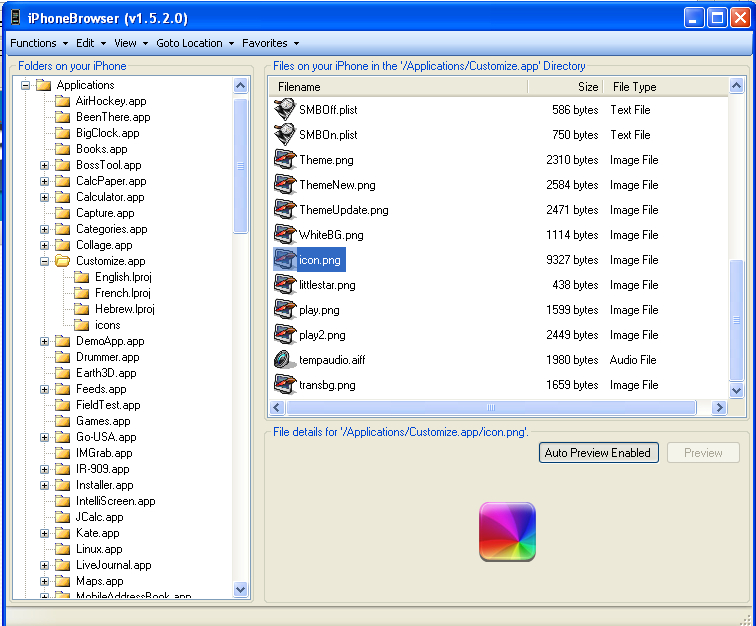
To use the application all you need to do is download the iPhoneBrowser file to your computer. You can go HERE to download the current version of iPhoneBrowser (at the time of this article, the file you want is SetupiPhoneBrowser.1.52.exe). Once it has finished downloading, open iPhoneBrowser on your computer. Once the application is open, on the right will be all the folders on your iPhone and on the left will be all the files within the folder. There is even a nice preview window. For more information on how to use iPhoneBrowser check out the developer’s Usage Page.
Note: Unlike SSH, your iPhone will need to be plugged into your computer in order for iPhoneBrowser to work.

 Loading...


 Loading ...
it doesnt use SSH?
LOL! I JUST found out about this today! I had to delete a file b/c I couldn’t change my lock screen anymore.
Thanks for posting!
awsome dosent need to be connected to wifi
I was wondering when are you going to post about this :-) I’ve been using it for a while already. It does helps out a lot, and way better than that SH method which was realy a hard time.
I totally agree. its awesome and easy to use
Mac users don’t need WinApp… Mac users uses mapping with the service AFP, much better and much easier of to install the service AFP in the iPhone and to configure in MacBook or iMac.
How can you do that?? Can you show me?, please? My email: rocket_the_king@yahoo.com I want to browse files on my iPhone but I don’t know how on my Macbook though.
Install the AFP service in the iPhone first. After your iPhone and Mac in the same network. Use the menu Finder click on Go > Connect to server. type in IP of iPhone with afp:// and Connect. Type in user name (root) and password (alpine), you’ll see iPhone Root FileSystem mount in your desktop and with your full access.
Com os cumprimentos do Brasil…
High,
I tried to install it several times, but it doesn’t work.It crashes anytime,even with the right files in the directory (itunesmobiledevice.dll, etc .) Any ideas ? I’m on XP SP2.
It happened to me once, but i downloaded again and the problem was solved. :)
This has already been out for a loooong time.
People who have jailbroken their iPhone/iPod with an old ZiPhone Version some time ago (2.6b) will need the ZiPhone iBrickr Fix or the tool won’t recognize the device as jailbroken.
The fix can be found in the Installer (-> Source: i.unlock.no)
It’s not the only application giving you such access over USB:
PC: iPhoneBrowser, IBrickr, iPhone PC Suite, Total Commander + T-Pot
Mac: iFuntastic, AFP, iPhoneBrowser for Mac
There could be more and none of them are new.
I use iPhone PC Suite for more than2 months and it is the BEST software to use with Iphone, you can do almost everything with it … just give a try and you will see….
Thx Brooke!
It might not be new, but we didnt know about it. Will definately give it a try!
Either it doesn’t work with 64bit OS’s or Vista, both of which I have.
Srry to disturb buth i already have the version 1.6.0.0 for a month and longer. So this post is seriously verry verry late and this 1.5.0.0 version doesn’t even work for 1.1.3 & 1.1.4 firmware.
This version works great for me, and I’m on 1.1.3.
Huh, I don’t see version 1.6.0 on the Google code download page….where did you get it?
nice spelling there, verry verry!! :D but also agree with undertaxx.. SSH is much more difficult than IphoneBrowser!!
Hey it doesn’t work for me for some reason. When i load it up, i can’t actully access the root of my iphone. It only allows me access to vars/mobile/librry. SSH and WinSCP gives me access to thle actual ‘root’ where Applications etc is and everything. Help anyone?
People who have jailbroken their iPhone/iPod with an old ZiPhone Version some time ago (2.6b) will need the ZiPhone iBrickr Fix or the tool won’t recognize the device as jailbroken.
The fix can be found in the Installer (-> Source: i.unlock.no)
ahh lovely thanks heaps =]
Here’s an idea: How about everyone who already knew about it kindly shutup. Obviously, if you already knew about it, Brooke wasn’t posting it for you. If you’ve known about it for a while, fine. But I’m sure those who didnt know about it will appreciate it no matter how long its been out. Sheesh.
I agree….
Actually….why didn’t they all mention it themselves?
This is a community right? If you find something awesome…
SHARE!!!
Hi,
my name is Peter and I’m am deveopling actually at this great “old” tool.
It will be a backup-tool, an synch/exchange/edit/backup-tool for calendar and contacts to synch with more than one pc.
I already wrote an enry into one german forum, to get more informations, which files are necessary to need a full
backup for each tool.
Can somebody help me to add to the browser the functionality of a backup-tool?
After this I will develop the contact and calendar-edit and synch with a few mail-applications.
At least I want to make an iTunes alternative application, but I’ve some small problems with understanding, how to generate the hash58.
Greets
…. I forgot:
my eMail-Address is peter@behnconnection.de, if anybody want to support me with informations…. :-)
If some people need an 64bit-application, I can compile immediatly a 64bit version.
The backup by itself is not particularly interesting as it can easily be done with copying script. Extracting and importing contacts/calendars to/from a csv-format would be something!
Colel.
Many people have no understanding of the technical background how to save/backup something.
Thats why people need this also.
hi Brooke,
just a heads-up. there was a pre-release patch for iphonebrowser over at his orig thread on MMi for a v1.60 which fixes a few more bugs and has better detection rate for already plugged-in iphones. this patch is just an exe file copied over to overwrite the v1.52 exe file. true enough, the v1.60 patch detects the iphone better.
It only goes into var/root for me not even var/mobile
Thats, cause you jailbreaked your phone with ZiPhone 2.??
You have to run iBrick Fix, to get whole acces at your iPhone.
If it’s like that, that some of your iPhone-services are currently not “informed”, that your phone is jailbreaked.
Mac users don’t need any application to connect to the iPhone. Just install the AFP service in the iPhone. Then all you need to do on the Mac is from Finder click on Go | Connect to server. type in IP of iPhone and click Connect. Type in user name and password and viola, your iPhone is a network connected drive. Move files on and off, delete, change permissions, etc.. just like a file that is on your local drive.
Thanks Ron! I just installed AFP on the phone and it worked like a charm connecting with my Mac. Nice info.
hi
i installed the software. i opened itup and i can see the folders. when i click to go to location- and then select ringtones or any other option an error msg appears saying it cant find the location and to make sur emy phone is jailbreaked.. and it is..
anyone can help?
It seems to be the same problem like the one of John
You have to run iBrick Fix, to get whole acces at your iPhone.
What good is this App? After installing and looking around…I can’t actually get it to copy or do anything other than browse.
Is this App supposed to be able to pull/push files to/from the iPhone?
If so…How?
Hi,
of course you can copy files from/to iPhone and you can also delete them on the iphone.
Greetz
THANK YOU SO MUCH :)
Hi, i just want to know how i can change permission whit iphonebrowser ty
Hi i’d appreciate it if you would help me with two things.
I want to move music and videos onto my iphone without using itunes.
Which, since i installed 8.0 has become very unstable. I downloaded ibrickr and another one mentioned above. ibrickr seems great for sounds and ringtones etc.
I realise that the music and video are stored somewhere on the iphone filesystem but they are encrypted. I just want to be able to move music and a few movies onto my phone, so i can watch them using the ipod app without using itunes.
Any help would be greatly appreciated.
Well, you might try to a) download any of the versions of Linux CD and use it live on your computer, then
b) connect your iPod/pad to this computer and jailbreak it (google for it, look in the settings which exact version of the firmware you have to get the right tool, I used evasion); and
c)install VLC media player, which plays everything, but is only available through Cydia, being removed from AppStore;
d) connect to the comp still running on Linux, the iPad will be recognised as a hard disk, then search for Media folder and put your videos directly in there, not to any of the subfolders such as Books, Purchases, Recordings etc as I already mentioned in the earlier post.
Funnily, I googled for this for Linux users and didn’t find anything relative. Maybe it’s just too simple so everyone knows that already? Hm…
Lastly, maybe you’d decide to try Linux and forget about crashing and paying for everything….
everytime i open it it crashes…
jailbroken ipod touch first gen.
software 2.2
I have downloaded every piece of software made to browse the file structure on my jailbroken iPod touch 2nd gen with 3.0 and this is yhe only one that works. I downloaded and installed 1.91 and it crashed every time, I downloaded and installed 1.93 and it works like a charm. I can see every file on my ipod and manage the disk like explorer. Awesome. Thanks for showing me this app.
Well it doesnt really work for my ipod touch, I go to “Goto location” and I click on any of those and it fails, and it asks if I’ve jailbroken my ipod touch, wich I have.
ipod brawser
ipod touch is good but we can use it to brawser in nigeria
please help me where i can find photospeak created video files in iphone pc suite.
thanks mate..been lookin for this
thanks
can ipond used to browse
Can you get an app on your iPod/iPhone where you can do this so you don’t need a computer
i need help! can i change my passcode through this! please help
Mine keeps crashing on startup?
Hey guys, I just tried to watch some videos and the VLC couldn’t find them. The thing is, I’m on Ubuntu Linux and you just plug the USB in and there you get the var/Media folder open in the file browser without using ANY software. So, the movies, to be seen by VLC, need to be copied to the Media folder, not to any of its subfolders (Books, Purchases, Recordings etc). I did try the OpenSSH, but it’s such a bother over nothing.
Hope this helps, at least to some Linux users.