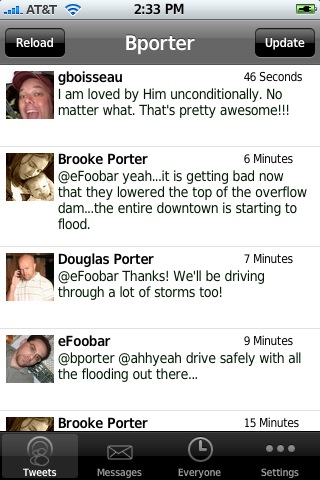
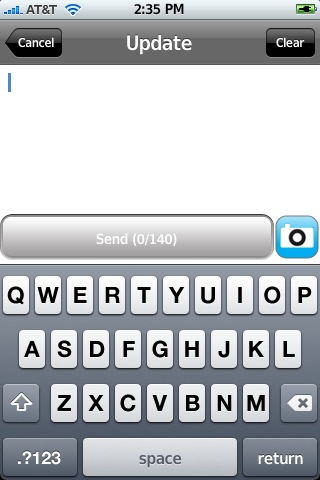
 The update to version 1.5.2 of MobileTwitter adds a new Update First option in the Settings. If you toggle on Update First…when you open the application it will open directly to the Update section. Which I think is a great new feature. When I open a twitter application on my iPhone it is usually because I would like to twitter something and then I go in and read all the tweets. I think I am actually going to start using MobileTwitter. I have not been happy with Twinkle’s performance lately. Though, they are still a few things I like to see changed in MobileTwitter…like when you reply to someone, the cursor says in front of the @suchandsuch instead of behind it so that you can just start typing. Other than the new Update First feature, I do not see any visual changes to the application. MobileTwitter is avilable through the NPike.net source.


MobileTwitter 1.5.2
June 11, 2008 by
 (No Ratings Yet)
 Loading...


 Loading ...
Related: what are your names on Twitter? I’d like to start following you. Or you can follow me… Send me an email.
Doug’s is – ahhyeah
Mine is – bporter
You’ve each just gotten another follower!
Thanks,
Skylar
Twinkle has been sketchy but I will not use any other Twitter App that does not have the “Near Me” feature and the ability to take/view pictures within the App. Every Twitter App should have these features. The website could have the “Near Me” feature easily by entering your zip code or something.
Like MaverickC17, I use Twinkle exclusively because of the Near Me feature. It singlehandedly turns Twitter from a super-simplified blog into social networking.
Even if I’m sitting in front of my computer, I’ll pull out my iPhone to send tweets. Just so my neighbors can enjoy them too. :D