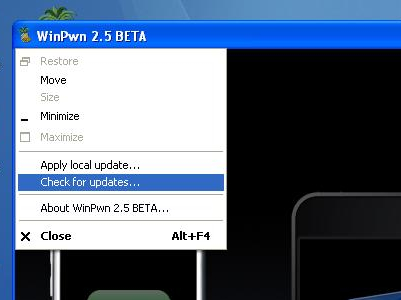
I just upgraded one of our 1st Gen iPhones to 2.0.2 firmware form 2.0 and kept getting an error using the QuickPwn feature of WinPwn. Luckily there is a new release of WinPwn that fixes these types of errors. You can download the update here. When upgrading, don’t forget to uninstall your previous version of WinPwn if you have one. To update just click the pinapple in the very top left corner and then click for updates. After the update the jailbreak went smooth with no problems.

 Loading...


 Loading ...
what does the update actually do, i mean does it actually make a difference or do you still get freezes and really slow texts?
You must have something else going on, because that is definitely not the usual behavior of a pwn’ed phone.
Or u can click on the pineapple in the top left corner.
Thanks for the tip, I’ll make note of it in the post.
Hi! i know this is off topic but there is two update in Cydia:
Winterboard
Cydia installer may be this package will fix the problem about cydia:
stuck on boot logo after intall some app in cydia!
Yes, I’m looking for a change log for winterboard and the Cydia update is explained on the cydia home page. I will write about it now.
FYI, the WinterBoard update isn’t a major feature update.
its been mentioned to douglas hope he contact developer to sort it out
http://www.hackint0sh.org/forum/showthread.php?t=49782
hm… winpwn still crashes while building firmware.. i do not have iphone 3g. any help? please.
nevermind. i’ve chosen expert and custom and it worked.
Follow BigBoss’ troubleshooting on the 2.5 Winpwn guide on sleepers.net. It says to adjust the “partition size” to 700 using expert mode. Same thing happened to me using basic mode. Just so everyone knows, using expert mode is just as easy as basic mode, you just get a few more options.
I quickpwn my iphone 3G 2.0.2 with quickpwn 2.3 if i quickpwn with this one wil I loose my cydia apps I just want to change the boot logo….Thanks
There’s been a couple of updates in the winterboard in the last few days, some are minor but some are kinda important.
Also, PocketTouch is out and updated. I really missed this one in 2.0
I also would like to get rid of the pinapple boot loader. I like my original apple back. Will I have to re-jailbreak and start from scratch.
In a word, yes.
After I updated the WinPwn 2.5.0.2 Beta 2 Update Released. Do i have to go thru winpwn step by step again ? or is it already update on iphone with cydia ?
I Winpwn a 1.1.4 2g without having to update through itune. Just Shift and selected custom 2.0.2.firmware while in DFU mode. Everything is fine, just cant figure out why I cant use a 78kb jpg custom boot logo.
I think this is a bug in Winpwn. I even tried it on another iphone that was updated with itune.
I just used WinPwn. It worked ok and has Installer and Cydia on there now. But neither one of them install anything. They both time out with network errors when i open them to there main page. If i go to where the apps are and install lets say Winterboard. It does it but when it finishs and says to respring, there is no Witerboard icon. If I go back into Cydia it will let me dowload it again and does not show it in the section of already dowloaded apps. What is up with this WinPwn?
WiFi doesnt work. It connects to a WiFi but safari, mail, cydia and installer do not work and have network errors now
I have successfully updated my 2g iPhone from 1.1.4 (ziphoned) to 2.0.2 with Winpwn 2.5. in custom mode and expert mode.
It was very easy, no problems at all. Just follow instructions and be patient as Winpwn does its job. I did not have to update first to 2.0.2 FW (ie; via iTunes) and then use Winpwn. Winpwn 2.5 updates, jailbrakes, and unlocks (2g phones ).Make sure you have downloaded to your computer the correct 2.0.2 restore FW file, and the two bootloader bin files, before starting the process.
Just restore (shift+restore on windows) in DFU mode the custom file that Winpwn creates and that is it! Easy. Thanks a lot.
i want to do it , but i am afraid of losing my contacts, sms’s, pix and everything !!
how did u back up them ??
Contacts, music, videos can be synchronized via itunes. The pictures can be downloaded directly from your iphone. When you hook your iphone, you just open explore the device and you can download the photos from the camera roll.
Notes, sms, applications, and any customization will be lost (not if only jailbreaking).
I do not care much for my notes and sms, so I went ahead and did it. I downloaded back most of my applications through Cydia. I do not have that many extra applications, so that did not bother me as well.
I really cannot tell you if you could backup sms and notes however.
yeah, me too! i have completely customized by ist gen iphone, running v2.0 firmware. i’m scared to sync with iTunes or go to v2.02 and Winpwn – cuz i dont want to lose my customizations. will Winpwn help me or is there another application i can run to save my customizations?
help!
has anyone been getting error message that winpwn is unable to locate ipsw file like i have??? help!!! what am i doing wrong?
can anyone be of help?! i have triesd to been trying to custom pawn my iphone, whenever i try to do this procedure with winpwn 2.5 beta, the soft freeze up also my iphone shows a white screen then later display apple screen.
thanks