 |
Available In: Cydia |  |
Price: Free |
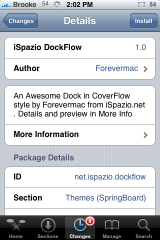
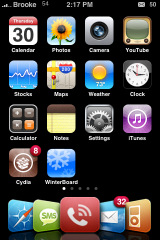
 iSpazio DockFlow is a mod that I noticed last night. It changes your dock icons giving them a cover flow look. It actually looks pretty cool however, there are a few restrictions with it. You need to have a five icon dock, the icons have to be specific icons in a specific order (Safari, SMS, Phone, Mail and iPod) and you cannot use it with other mods such as Stack. But, if you are willing to deal with these restrictions is does look pretty cool. Once installed, you will need to activate it via WinterBoard.

 Loading...


 Loading ...
It so cool.. already installed :)
How i can activate? Winterboard are empty ;/
It shows up in WinterBoard as DockFlow by Forevermac.
Cool i do it :D
Nice idea, but only if you have those 5 (Safari, SMS, Phone, Mail and iPod) in your dock.
Looks cool but my only problem is the SMS location. When I have a text and the badge shows, it”s covered by the phone icon and can only see half the badge which annoys me.
thanks again brooke
we are working to add the possibility to change the icons on the dock
Adam K: Tap an icon , they will start to “vibrate”. Then click the SMS icon and release it. Click on the home button and the bandage it’s fixed
I fixed all five badge mess ups by wiggly selecting each icon on the dock from right to left.
I’ve installed the dock its sweet!!! The only issue is that my SMS and PHONE icons remained small and the settings and photo ones became large as if they are a part of the dock flow, can you help me with that?
Thanasi, in cydia you can find:
– DockFlow
– DockFlow iPod
you have installed DockFlow iPod on the iPhone.. that’s why you have this problem..
the ipod touch is missing some icons like Text and Phone, so i did a new version with new icons for Settings and Photos, but you need to install the iPhone version on the iPhone :D ok?
i’ve also added more downloadable icons to customize the dockflow theme on iSpazio
i can’t see in cyda (ispazio repo. How can find it?
too bad i cant have a theme on, well the flowdock is cooler than the theme so.. :P
Um,i have the hackintosh theme on,and it works.
neat mod,
but m looking forwrd to icon replacement’s of choice…
Cheers on tht ispazio!
Dude,
If it only comes in that order, what order will it be in for the ipod touch users?
can someone please help me to place five icons in the dock
I was using 5 icon dock with those five icons anyways, and met all the restrictions anyways (besides icon order).
I love the look of this dock and is worth changing the order of the icons for sure.
it wont work for me
iPhone 1stgen
2.0.1
y i can’t find it in my Cydia
plz tell me whr to find it its not in my cydia evn though ispazio;s source is ther??? :(
i cant find it in my Cydia either =3=;
i can find it idk why
BTW! It would be better if you had maked it clearer
Clear Like all other apps in springboard and not just 5 but a working flow with many apps… xD
Sorry for triple posting but i keep remebering stuff.
it would be better if the springboard dont completely get messed up when you apply a app in winterboard.
Then i haft to re-arange all the time…
hay brooke,
how do you get your badges to look like that?
Hi Ispazio, Iv installed this and lit looks great. Just one slight problem.
Iv got one missing icon on the main page it wont let me fill that up so basically now after moving SMS to the dock i only have 15 icons instead of 16 on the main page. any ideas how i can move one more?
Also mate because i have LockDockBar installed how can i change the icons on the lockscreen like the same as it is on the main page?
Hope that makes sense. If you need screenshots pls let me knw.
Ispazio Rocks!
i can’t find de dockflow in cydia also installer to, what i can do?
i’m soo confused! i have an iphone 2G running 2.1 i downloaded ispazio themse and appleSMS from ispazio..but how do i open them? don’t i have to have a primary app so i can access these them downloads? please help!
I don’t have dockflow either how many times do we have to ask before you ppl celebrating tell us the source plz?
Can any1 upload this as the ispazio repo has been down for a while now and im eager for this… plz
do not search for it on cydia, go to All Packages and look for it under the letter “i”
Who ever had problem finding the “iSpazio DockFlow” Do This:
– Open Cydia > Manage
– Scroll Down a bit, you Will Find iSpazio with a Question Mark icon
– open iSpazio and Scroll Down a bit, Remember iSpazio DockFlow begin with “i” so you have to Scroll Down…..
– you Got it ;) iSpazio DockFlow and iSpazio Dockflow for iPod, If you have iPhone Choose iSpazio DockFlow, and the iSpazio ipod for ipod.
Do Not Add iSpazio Source ever, because its already there ;)
Regards…
Does anyone know where these icons are stored inside the iphone??? Because i wanted to retouch them with photoshop, and maybe even make icons like these for other apps.
in OS3, there’s seems to be a new messages icon without the ‘SMS’ text on graphic. However, it’s now positioned flat versus slanted to the right. Is there any fix to this?
where are the icons stored?
fixed… renamed Text.png to Messages.png
I have been using this theme for months, but with the 3.0 update, there is a problem. The text program is now called “Messages”, which means it uses a different icon name, breaking this theme.
To fix it, use something like DiskAid (or SSH, or the equivalent) and go to root/library/themes and find the Dockflow theme and go to the Icons folder. Rename Text.png to Messages.png and then respring.
I’ve been trying to download DockFlow from Cydia, but I keep getting the error “Size mismatch”. What have I done wrong? I really want this dock badly :)
i have the same problem D:!!
My dockflow isnt moving? Is it supposed to move or am I just really stupid?
Muy muy bueno….!!!! 10 puntos!!! gracias
hi…
I can’t find ispazio dockflow in my iphone2g cydia, I searched for it but nothing by this name came on the screen …. kindly help…!!!
plz help me I can’t find ispazio dock flow? what is the source thanks