 When recently upgrading to firmware 3.0 on my iPhone, I lost all of my apps that were in folders using the application Categories. Categories lets you make an icon on your home screen that opens up to more icons allowing you to organize your springboard. I don’t know all the coding details but I know when adding something to a category it makes it disappear from the home screen. This gets stuck that way when going straight to a new firmware. I tried reinstalling the app but the App Store shows it’s installed. I also removed it from iTunes, resynced and reinstalled and it would show up but disappear after rebooting.
Then I remembered a setting in the stock settings that resets my home screen. Just navigate to your Settings App, General, Reset, Reset Home Screen Layout. Now your home screen will show all your apps in alphabetical, except the first page.
P.S. Of course just removing them all from each category would have worked to, I just forgot…
-
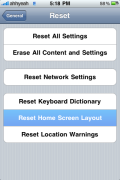
- Reset Home Screen Layout
-
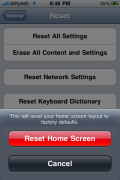
- Reset Home Screen Layout

 Loading...


 Loading ...
Because Categories uses Apple’s method of hiding applications, the hidden applications are able to stay hidden in non-jailbroken firmwares. One way to unhide your applications in addition to the method you gave above is to go into Settings>General>Restrictions and first enable restrictions, then disable them. This un-hides all hidden apps.
Wow thanks alot, the restrictions way worked perfect!!!
Does this also fix the lost apps hidden using spoof? I restored my phone and forgot to “un-spoof” some apps, after restore, they’re nowhere to be found.
I’m going to guess yes. I think spoof is what categories uses to hide apps.
The “Reset Home Screen Layout” didn’t work for me with 2.2.1. Thanks for the “Restrictions” tip, that did work.
Hi Douglas
Can you tell me if categories were added to the address book?
Or do all of the addresses have to be in one main “category” the way they are now?
If there are categories do they sync with Google address categories?
I don’t see a way to do categories but I do have the option to search my gmail contacts along with the contacts on my iPhone.
Contact groups are already supported actually. You just have to create the groups in Address Book on your computer and sync. Or with Gmail contacts, make the groups and sync with the app Sync in a Blink.
Did anyone release a jailbreak for the new iphone 3.0 firmware???????????
I am very curious.
how fast the new firmware moves? did you get a frozen screen, or something? did you have to reboot the phone after every 15 minutes (like I have to do on my 2.2.1) to work properly?
if I want to upgrade at 3.0, where are the steps to jailbreak? how many apps work on 3.0?
finnaly, your advice for me is to upgrade, or not?
thank you, iphone school.
The keyboard has been VERY laggy for me. One app so far won’t let me input text (Deliveries) but all others work fine. I have only had to reboot once so far. There is no jailbreak yet. If you can live without your jailbreaks, then yes, upgrade.
mh nice idea, i missed also some icons when i upgrade to fw 2.2.1
One of them was Cydia, i´ve put them into SBSettings Dock, so it was hidden from the Springboard. But to get SBSettings you need Cydia ;-)
Reset Springboard *ditsch
if you say that the keyboard has been very laggy, I dont wanna upgrade. One of the most important thing for me is the “lagg-less” keyboard…hope apple fix that soon
Douglas, did you upgrade in iTunes directly from a Jailbroken firmware? Doing that leaves all of Cydia’s modification of your media partition intact and also results in the loss of about 500MB of space (as well as possibly making your phone unstable). You should really think about doing a fresh restore of 3.0 for these reviews, as upgrading from a Jailbroken firmware can cause numerous issue.
Hi Douglas,
I am currently on firware 2.2, but would like to upgrade to 2.2.1 through iTunes.
As I use ‘Categories’ and have all of my applications in folders, I’ve been advised to do the following :
1) Remove everything from their folders back to the home screen
2) Uninstall ‘Categories’
3) Upgrade to firmware 2.2.1 in iTunes
4) Re-jailbreak the phone
5) Reinstall ‘Categories’
6) Create my folders again and put all of my apps back into their folders
Obviously this is a lot of work – could I simply :
1) Update
2) Re-jailbreak
3) Install Categories
4) Reset Home Screen
Would this work ?
crap, all of you posted here like a year ago, but this happened to me. well here’s the thing;
-i have a jailbroken ipod touch 2G MC model 3.1.3
-i have successful used cydia, and dl categories
-i have cydia, categories, ifile, etc in a folder
-i so happened thought of resetting all my settings
-after that i opened my folder and there were no apps
-i clicked on the icon on the lower left, it opened categories
-it prompted something like an error with my categories, i chose the option to ‘repair’
-then i went to manage folders and it did not show any of my folders
-i went out of categories the it resprung my springboard
-now none of my folders showed up
-cydia and the other apps are missing
-my other apps which came from iTunes are also missing (which were in another folder also created off categories) but they show up on iTunes in the computer that they are insalled
-i tried to rejailbreak again using spirit but cydia did not appear or anything
-i tried the tips above, resetting home screen and enabling disabling restrictions, both did not work
now i know this aint the proper thread but this is the only one i found, please help
um……………….english please??? ;)
I found alot of very UNUSEFUL suggestions online to getting your apps back. Heres an easy fix…..on your computer in Itunes, click “valued customers ipod”. Then at the top, click “apps”. It will give you the option to select your apps and sync them.