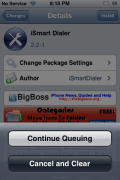
 Ok, I’m not sure how long this has been there but, I just noticed that Cydia has a Queue feature! Yesterday, I was installing an application and I decided to Cancel it instead of Confirm it (which I rarely do)…that is when I noticed the pop-up had the options to Continue Queuing or Cancel and Clear. I was like, WHAT…when did Cydia get a queue!!! So, I thought I would check it out! Here is how it works.
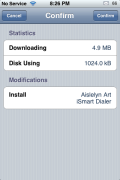
When you select Install on an application, you get the next screen in which you can Confirm or Cancel the install. If you select Cancel, you are given the option to queue it or to cancel the install. If you select Continue Queuing, it will keep that app in a “Queue.” You are then able to add more applications to the queue by selecting them, selecting install, selecting cancel and then selecting the Continue Queuing option. Once you have added all the apps you would like to install to the queue, you can select Install on the last application and then select Confirm (you will notice that all the apps in your queue are listed on the Confirm page)…this will install all the apps in your queue.
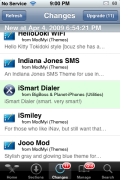
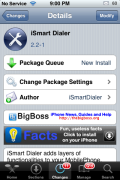
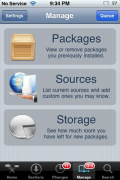
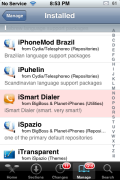
I did notice a few other nice features. When you add an application to the queue, it shows up as a light green color in your application list in Cydia (making it easy to see which apps are in your queue). If you select a package you have added to the queue, you will see that it also adds a little area before all the apps info saying that the package is in the queue and what is going to be done with the package (such as; New Install). You will also notice that it adds a Q’d badge on your Manage option on the lower menu bar. If you select the Manage option (when you have apps in your queue) there will be a Queue button in the upper right corner. When selected, you will get the “normal” Cancel or Confirm page in which all your queued apps are listed. If you select Confirm, it will install all the apps in your queue.
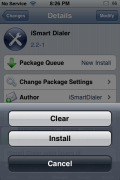
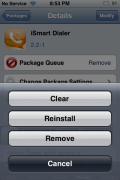
If you decide that you would like to remove one of the applications from the queue you can select that application again and then select Modify in the upper right corner (where it normally says Install). You will get a pop-up with the options Clear, Install and Cancel. Though, I cannot really figure out how to use the clear option. When I select it, it brings me to the Cancel/Confirm page. If I select Cancel it just brings me back to the Continue Queuing or Cancel and Clear pop-up. If I select Confirm, it installs all the apps in the my queue…including the one I wanted to clear. Let me know if you have figured out how the Clear option works.
Another issue I have run into is that if you add a few applications to your queue and then you accidentally hit the Cancel and Clear option, it clears your entire queue and not just that current application. It would be nice if it would clear just that app and not your entire queue.
Overall, I think it takes a little time (and a few tries) to really get the hang of using the queue. I think there could be a few improvements to make it a little more user friendly but, still a very awesome feature!! Honestly, I’m totally psyched about the queue…it is going to make my job a lot easier!
P.S. You can use the queue feature the same way for uninstalling apps as well.
P.S.S. I will be making a step-by-step guide on how to use the Cydia queue for our F.A.Q page…I will post a link once I have it is ready.

 Loading...


 Loading ...
Thanks for the update on Cydia! I’m still going to stick with Icy since it’s faster.
The queue feature has been around since the update of Cydia that introduced the Cydia Store.
I figured that’s when it was implemented.
i noticed it the same way the other day XD
Cy doesn’t work for me and installer too
I mean icy doesn’t work anymore and installer 4.1 too
Cydia is still working
I also discovered this by accident. Very very useful.
This feature has been around for quite a while now
…yeah, since before the FW 2.x era
Cool app I’m going to install it
Cool app
just a heads up, if you have something in your queue and you try to add a source, it crashes your phone, well, it crashed my phone lol, so be careful with that
noob