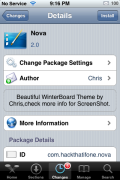
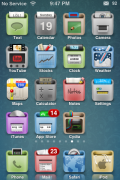
Nova is a very unique theme…it is clean and well designed. It contains 21 icons, a dock, status bar, badge and wallpaper. The only downfall is that there is no icon for the Maps application. I even took a look at the folder to make sure it wasn’t spelled incorrectly but, nope, no Maps icon. The upside is that the folder does contain a .psd file so that you can create your own icons. So, if you are ssh savvy and photoshop savvy…you could take care of the no Maps icon problem. If you are ssh or photoshop savvy…you might have to wait for an update before getting a Maps icon! Hopefully we see an update soon!
 |
Available In: Cydia |  |
Price: Free |
How to Install
1. Your device must be jailbroken. (how?)
2. Make sure you have WinterBoard installed via Cydia.
2. Make sure you have the iSpazio source installed in Cydia.
3. Search for Nova in Cydia, run the install.
4. Open WinterBoard and activate the Nova theme.

 Loading...


 Loading ...
I really like this theme a lot. It’s quite clean and nice. How do you forget the Maps icon though?it’s stock! I’m not talking crap, but more of a thing to lol at. Nice work though.
I like the icons, but couldn’t care for the wallpaper. Is there a dock?
Maps Icon
http://i450.photobucket.com/albums/qq228/saleh318/maps12124.png
Forum for release (icons usually posted there)
http://macthemes2.net/forum/viewtopic.php?id=16793425
Sweet Action!! Thanks man!
thanks man, but how do you add it, so it converts to the new icon?
Rename it to “Maps” and put it in the icon folder inside the Nova theme folder via SSH.