 David Pogue, the tech columnist for the New York Times, recent tweeted that you can install more than 180 apps on your iPhone and then access them via Spotlight search:
You can install UNLIMITED APPS! Only 180 show up as icons—but Spotlight can find and open all of them! (And yes, we tried. Stopped at 250!)
The only problem I see to this is that if you install your 181th app, you won’t be able to move it to a page to organize your apps since you can’t see it on any of your home screens. You’d also have to uninstall the app via iTunes on your computer because you can’t see it to tap and hold on it if you wanted to uninstall.
Since my iPhone is jailbroken, I am using categories to organize my apps that aren’t on my first couple of pages. Unfortunately none of this works on Web Apps. You can’t Spotlight search for them, you can’t put them in categories, and you can’t even put then in a Stack.
-
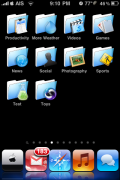
- Categories
-
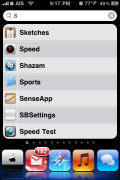
- Spotlight

 Loading...


 Loading ...
Even know I’ve known about this, nice find!
verry gooooooooooooood :D
with 5 icon columns on you can have 225 icons (including dock) i think if you have any more then this you may need to go see someone ‘cos you’ve got a problem.
That’s what I’m doing! I have 250+… LOL JK I don’t think anyone has that many apps on their iPod/iPhone!
if u delete any apps from the shown 180 apps then u can reset home screen layout from settings and the hidden apps will show up in empty spaces…. tried and tested… enjoy
i know that..and if you restore your phone from back up..you will never see the apps that you put in folder of the categories. So it’s not a good idea to install it….
I use categories, and for searching for my apps, i installed spotbright. You can search for your hidden apps or the ones located in categories and even checks for the ones you recently used. A great App for jailbreaked iphones :-D
So true.
What happens if you install over 250 Apps? Currently using Catagories, so that I have only 4 pages of apps.