 Last night I was taking some pictures and video and went back to review them and there weren’t in my camera roll. I didn’t think much of it because my iPhone is jailbroken and things like that happen when you test as many apps as we do. I decided to respring my springboard and try again. That didn’t work so I rebooted. Still didn’t work. Now I’m getting worried. I really don’t want to restore my iPhone and start all over again. I did notice that the pictures I was taking were showing up in the little thumbnail at the bottom left of the camera app each time I took one. I then thought my iPhone might be full so, I plugged into iTunes to see. Nope, I had plenty of room. Ah ha! I thought I figured it out. Most cameras name pictures starting with img_0001 and go to img_9999 and start over. I thought it had done that and the pics were starting over at the top of my camera roll… nope.
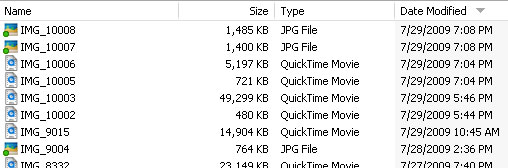
I then decided to plug in my iPhone and see if the pics and vids were there. They were! And guess what I found? The filenames of the pics not showing up are img_10001 through img_10005. This means there is a major bug in Apple’s firmware. I can’t see the photos in any other apps either. Now I can’t upload them to flickr, facebook, twitter, youtube, etc. The worst part of all? I have no idea how to fix it. The only way I can think of is to restore my iPhone. If you have an idea, I’d love to try it. I’m quite annoyed that it doesn’t work anymore.
Update: I have found a fix:
1. Sync your iPhone to backup and copy all photos off your camera roll using your computer.
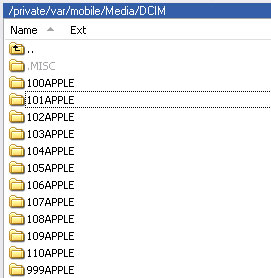
2. Use a directory browser such as PhoneView (Mac – download), iPhone Browser (PC – download) or SSH to delete these folders:
3. Now just take a picture and you’ll see it shows up in the camera roll. I noticed that taking a screenshot still used the old numbering scheme. I went back and deleted everything again and rebooted my iPhone and then it works fine.

 Loading...


 Loading ...
10000 pics on your phone? That’s the problem. The solution is take the pictures off the phone every now and then. Why would you want so many pictures on your phone? Doesn’t it take for ever to scroll down to the bottom 8000 or so pics?
There is not actually 10,000 picture on there now. I take them off over time. There was only a few hundred at the time. I’ve just taken over 10,000 pictures/screenshots and the file names got that high. The iPhone stops displaying the images in the camera roll once the file number gets over 9,999.
Hey guys I have “swapcameraroll” from cydia. It gives me two separate camera rolls would that mean I could take 20,000 pics! LOL
Thanks! Had the same problem and tried everything but the last step a few weeks ago. No everything’s back to normal. :-)
Greetings from Germany,
Ben
@ willie
At some point the counter doesn’t work correctly anymore since FW 3.0. … So that weren’t actually 10.000 pics. ;-)
Good Tip.
But yea,not sure why you want so many pictures on there.
But hey,it is your iphone not ours right.
I was going to get an iPhone too.
Oh well…;)
Needless to say! The answer is under your chin!
i had the same problem a year ago, after installing snapture. the pics were missing after shooting. i’ve ssh’ed (or browsed with-in iphone can’t remember) to dcim folder and saw there were a few empty folders. I’ve deleted them and everything was back to normal.
Please explain how to do this.
What is ssh?
What is dcim folder? Where is it?
Obviously I’m not a techie-someone help please!
Healingmeditation@hotmail.com
Thanks,
Steven
I had the same problem, and you fix worked PERFECTLY. Thanks a TON for sharing!
THANK YOU SO MUCH!!
I had the same problem. While I only had 80 photos in the Camera Roll at the time, I’ve taken so many in the past that the file name exceeded 10000. But after deleting the 100 APPLE folder (which was empty anyway), it reset the file counting and now the file name is down to 0001! Don’t think I’ll have to worry about this problem for a while. =)
hey, this is really buggin’ me!… it won’t let me delete that specific folder, (100 apple) or any of them… did that happen with you?…
@ reubenzino, use winscp to get into the iphone files then deleted misc and 100APPLE folders then rebooted the device.
Hi, I have this problem tonight. I only have 20 photos in the camera roll! I remove the photos every month, but have still only taken 1,000 not 10,000 photos.
I’ve checked and have a load of empty folders -I’ll delete and hopefully this will sort the issue.
Thanks for the post
@richardmackney
I have the same thing – took about 750 photos but only 515 show up on the screen.
I don’t know what “ssh” means or even how to do what you’ve instructed to fix it. Can anyone help?
Thanks,
Steven
thank you!!!
I just had this same problem. I had taken photos off of my iPhone and moved them to a flash drive I have. I was using my mom’s computer that I got her since it has Vista and you can copy photos, as I’m sure you know your iPhone will restart if you delete an image with XP.
Well, I thought I messed up my phone and I was going to have to restore. All of the fixes I found used a mac-specific program (phoneview). I saw this and tried iPhonebrowser to no avail. Then I realized, iTunes may need to be installed first (remember, I’m using my mom’s computer, not mine) . I installed iTunes and reopened iPhoneBrower and it worked!
Thanks for the very helpful information!
~Andrew
Yes! I bought PhoneView in July but only got around to using it today (8.24.2009). As Douglas posted (July 30, 2009), I had a whole slew of those “100Apple to 999Apple” folders. First, I moved all 3,000+ photos and screenshots from the Camera Roll to a folder on my MacBook hard drive. Then I deleted them from the iPhone 3G. This was *much* easier and faster than using iPhoto’09, which tends to crash if I try to delete more than 150 images at a time.
Then I simply selected all the 100Apple to 999Apple” folders using PhoneView 2.2.3, clicked Delete, and disconnected the iPhone 3G. I shut it off and turned it back on for good measure. My camera photos and screenshots show up fine now.
PhoneView is very handy for many other tasks, and I recommend investing a $20 for it. Anyone who can afford an iPhone, or just a good case for an iPhone, can afford that.
A way to view all pictures again on your iPhone is to use the free App PIXELPIPE. This is a temporary fix for viewIng and mailing/uploading them in case you are travelong withouthaving access to your computer.
I had this problem with only 1650 pics. No where near my 16GB capacity. It’s faster easier to “Keep all photos” rather than delete allthem put some back, although I have made a folder I sync called Put Back on iPhone
:-)
Just a quick followup on my last post.
I used an App called Mobile Studio to delete the empty 100APPLE folder (plus others) and now the camera is taking pictures and storing them correctly. It’s naming the pics from 1 again so don’t overwrite any you may of already saved with the same file name on your desktop.
I was glad to fix this while on the move, as I was on holiday with no desktop access!
Thanks for the post.
@richardmackney
What is SSH?
I see the folders in Vista but it does not allow me to delete them.
Would iPhonebrowser resolve this?
iPhonebroswer worked flawlessly.
Thanks for the help.
I am Thrilled that you found a fix for this. I’m a photographer and I take many, many photos and soon enough I’ll reach 10000. I don’t know what that software for the mac is but i’ll look for it.
I had already called Apple Inc. and out of three tech support people, two had absolutely no idea what I was talking about and the third said he was an engineer and this problem was just announced at it’s last update meeting, and as of now there are NO plans to do anything about this, “…because it is of such low priority and very rare…”
That was discouraging. In a short time the problem will affect droves and droves of heavy camera users. Sooner or later Apple will have to do something about it.
But your fix is encouraging. Thank you.
Steven
Freakin’ awesome!!great fix Thank you soooo much!!
Is there anyway to restore the photos using iPhonebroswer?
Thanks for sharing, i was able to fix this problems :) It works and had no issues right after I reboot my iPhone.
Don’t think that it has anything to do with the amount of pics taken. I just got the 3GS about a month ago, and only had 11 pictures on it and it started doing this tonight. Deleted the DCIM files with iFile. There were only 2 , the MISC. and the 100APPLE. Now it is working perfectly again…..Thanks a lot for the informative post. Really do appreciate it!
Thank you for this fix!
It’s really frustrating that this is so indicative of Apple’s paradigm, and no wonder that NONE of my damn Apple devices have worked once I’ve actually got any quantity of work done on them. Apple’s computers work great until you actually USE them, then they seem to always have this same problem: TOO MUCH DATA! CANNOT CONTINUE! SPINNING GAY BEACHBALL OF DEATH TIME! CRASH!
Of course, the “geeks” only know how to bite off the heads of snakes and chickens and never have a clue how to actually make the computers work. Sad sad sad.
iphonebrowser keeps crashing and is not of any help to me, I have about 1600 photos and videos and already the filename exceeded 10000 and it’s extremely annoying! I will try at home with iphotoor phoneview and update to OS 3.1
If you hit both the power-on/off and the “application “(bottom middle) button at the same time, iPhone will take a screen shot and save it in camera roll. That’s a very good feature as you can take snap shots of anything including videos that is playing on your iPhone at that time…. but hold on, there is a bug that goes with it…..it will also move the IMG number up to the next 1000, so if you are at IMG00123, the snapshot will be at IMG01000, and if you now take a normal picture, then another snapshot, it will go to IMG02000. This is what got me up to IMG10000+ so quickly.
Wow, good catch Echan! I was wondering how this keeps happening to me even though I don’t take too many pictures (but I do take screenshots often).
So basically after 10 screenshots I have to go in and delete the 100apple folder?! That is a pain!
Any word on if 3.01 fixes this issue?
re: Screenshot increment of 1000, I’m jailbroken at firmware 3.1.2 and after doing screenshots, the next image increments by one. I do many screenshots and I have only the 100Apple folder and a .Misc folder inside the private/var/Mobile/Media/DCIM/ folder on my phone. My phone works fine.
HOWEVER I’m reading this board because…….My wife’s iPhone, also at 3.1.2 is showing the symptoms of images being taken and not showing up on the camera roll. SHE has 100APPLE, 102, 103, 104APPLE etc in her phone. She is a pictureholic so I’m trying to salvage these images. Her phone for some reason will also not show up in iPhoto 09 ver 8.1.1 (149) ……. suggestions? Deleting the .MISC folder in the DCIM folder did not help.
Next up is deleting everything in the DCIM folder and praying that I don’t lose any images.
Follow up to earlier post: Deleting the .Misc folder inside the private/var/Mobile/Media/DCIM/ folder on my wife’s phone solved the issue of photo not showing in Camera roll after taking it for now. Still can’t view the images in the 016APPLE etc folders, but I’m pretending they don’t exist for now…..
The phone now shows up in iPhoto when attached and iPhoto is launched. Good to know…..
FYI Dave in Dallas
THANK YOU THANK YOU THANK YOU
This has been driving me nuts for weeks, and the fix worked!!!
I cannot delete the ###APPLE folders (Windows Vista). I see them in windows explorer but get an error when I try to delete them. I downloaded a free app: http://www.iphone-explorer.com, and was able to delete the 101APPLE thru 108APPLE folders quickly and easily.
I was only up to 9700 pictures so I hadn’t had the problem yet. Before I did this I had about 24 pictures in the name range of IMG_9700 thru IMG_9724 in 109APPLE folder. I never have more than a few hundred pics in my camera roll because I move them to my computer in Windows Explorer regularly.
After deleting those folders in the iPhone Explorer program, I went back to iTunes and it had an error. So I closed iTunes, undocked the iPhone, took one picture with the iPhone, and then rebooted the iPhone. Docked it again, and Voila! Windows explorer shows 101APPLE with the one new picture (IMG_0001) and the previous folder is still there – 109APPLE – with the 24 pics I hadn’t deleted before. iTunes sees my phone, synchs properly.
Now, one thing I haven’t seen anyone talk about in all my google searching about this issue is duplicate filenames on your computer. You care about seeing the pics on your iPhone, but no mention is made of the fact that you will now have two files with the same name on your computer. That makes for bad organization of files. I want one unique name for each picture. I recently discovered Adobe Lightroom, which renames files based on a naming mask you create. Of course Lightroom does a lot more than that and is an awesome program for image editing and organization of pictures. But if you only want to move and rename your files so that you have unique names, you can use a free program I’ve been using for years called Media Sort: http://mediasort.sourceforge.net/ It uses EXIF data for the date the picture was taken. (If you don’t know what EXIF is, google it.)
The UI isn’t that pretty but it works fine. The file naming pattern I use is:
[Exif – Date/Time Original – Year]/[Exif – Date/Time Original – Month]/[Exif – Date/Time Original – Date]/[Exif – Date/Time Original – Year]-[Exif – Date/Time Original – Month]-[Exif – Date/Time Original – Date] – [FS – BaseName].[FS – Extension]
……which gives me filenames like this: 2009-11-15 – IMG_8110.jpg
inside folder structures like this: C:\Users\linkwoman\Pictures\target\2009\11\15
Oh and when I handle anyone else’s files, I add their name to the end of the file naming pattern (2009-11-15 – IMG_8110_Debra.jpg). So if my name isn’t in the file, I took the picture (that’s 95% of the files). And if I am looking for files my sister gave me then I’d search for *Debra*.
I hope this helps. I was extremely excited to find both Media Sort and iPhone Explorer.
~LinkWoman
Hi, I have the same problem. I was able to open the DCIM folder but I couldn’t delete the folders. It tells me that my iPhone was either disconnected or something. Please help.
I tried this and it still won’t work
Oh yah I can’t get my pics off my other camera roll how do I get them too I can only get the pics off the one not the other. Please help
GENIUS !!! thank you so much !! :3 i was worried if i needed to restart my iphone =3= since its jailbroken , and i get apps freely , they’ll be lost , and i can’t sync them from itunes . idky , just it wont work out =3= thank you so muccch ! :) you solve my problem ! yay ! my iphone had been like that for 3 months i guess =___= lame . but you’re a iphone saver ! THANKS AGAIN !!
YOU ARE THE BOMB, THANKS ALOT
Whoohoo!!! This had been driving me crazy for the past month & i followed all your steps & now my pix are showing up again! Thanks!!
Thanks a bunch, it worked perfect, used winscp to get into the iphone files then deleted misc and 100APPLE folders then rebooted the device.
@LhaveBerryXo, get AppSync from Cydia then you can sync free apps.
i have a problem with mine. i only have about 400 photos on my camera roll. yet under settings nd so what, it says i have 2 billion photos. lolz but the real problem is dat i cannot view any pictures on my ipod at all. it has a tendency to crash after a short period of time nd its driving me nuts. ive got iphone browser nd tried to delete these 100apple folders but i only have 1, nd dat folder has all my photos in it. any ideas?
i have over 20000 pictures in my camera roll
God BLESS you man! :-)
this guide solved my 2 year problem on my iPhone 2G running iOS 3.0.1. I deleted all folders except the MISC folder.