 |
Available In: Cydia |  |
Price: Free |

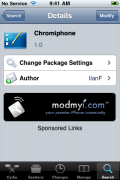
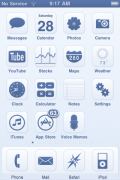
 Chromiphone is a WinterBoard theme that contains 91 icons, a wallpaper, dock, status bar, page dots and badges. For some reason this theme seems familiar to me but, I see a lot of themes and sometimes they blur together! You can get Chromiphone via the modmyi source.
How to Install a Theme:
1. Your device must be jailbroken. (how?)
2. Make sure you have WinterBoard installed via Cydia.
2. Make sure you have the modmyi source installed in Cydia.
3. Search for Chromiphone in Cydia, run the install.
4. Open WinterBoard and activate the Chromiphone Theme.

 Loading...


 Loading ...
it’s Actually called iChrome :p
this theme installed a Rick asthley ( spelling may be wrong) wallpaper on my lockscreen. I have removed the theme and it didn’t removed it
You got a virus on yor iPhone change your ssh password to avoid that