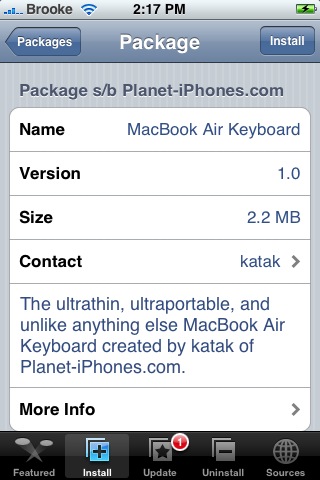
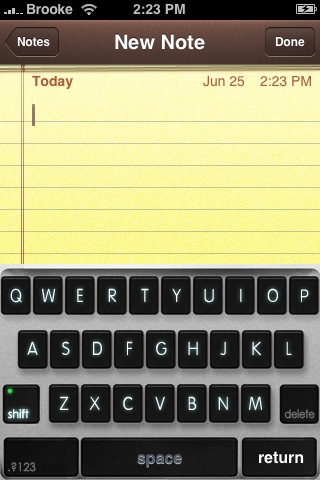
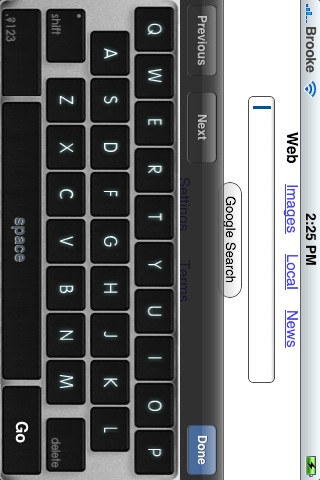
The MacBook Air Keyboard mod will change your stock keyboard to a black and silver keyboard that resembles a MacBook Air keyboard. I was able to install and uninstall this keyboard with no issues. The MacBook Air Keyboard is available through the Planet-iPhones source.
Note: If you have a custom keyboard already installed, make sure you uninstall it before installing the MacBook Air Keyboard.

 Loading...


 Loading ...
the “more info” pictures are slightly different than what it actually does.
– no text on the space bar
– command/apple key?!
the command/apple key stands for the ‘world key’, the one used to change the language of your keyboard if you have more than one language set :)
lol i put this one on yesterday… is pretty cool!
How does this work with other keybs.. for example Eng+Greek together?
check out my website for my 3g iphone screenshots. yes i have one
This has completely messed up my iPhone’s stock keyboard after uninstalling.
Whats wrong with your stock keyboard?
After uninstalling it the caps button disappeared when I went to caps and now nothing works. It crashes every app now. It will not reinstall so I can try uninstalling it again. I’ve tried to fix with another customize keyboard but that didn’t work.
Ok….This has probally happened to you. When you installed this app the first time a pop-up screen asks you if you want to UNINSTALL any previously downloaded keyboard before you continue. I didn’t read the whole thing and selected “Yes” thinking it was just a warning. To fix the problem reinstall the application and select “No”. It works ok then.
I tried it, and shortly got rid of it. There is not much I like about the stock such as the Calculator, the stock icons etc, but the one item I do like is the keyboard. Keep it.
Scared to install this if people are having problems.
Stay away!!
I tried everything to fix this. I got to stop crashing SMS but it still didn’t work right. All other keyboard locations were still messed up.
I am restoring now :( Using TimeCapsule.
I installed it and decided to keep it. No problems but I haven’t tried uninstalling it.
what I have to install and now I have no keyboard I get all black in the area of the keyboard and I do not appear in installer to uninstall.. please Help!!!!
SSH the keyboard out
ok i fixed the problem.. just reinstall the application and now works wonders .. only was a shock. thanks god!
Yeah, try uninstalling and see what happens. The black will probably come back.
I had no problems with it at all
i really like sticker’s keyboard from danimator’s source
guys word of wisdom stay away from stock key. Or you will be restoring. It is not worth it.
DO NOT INSTALL … screwed up my phone and had to reinstall everything! YOU SUCK!
Same here :(
hey guys, you may want to correct one thing this mod is in the big boss source beacuse planet-iphones merged with him
well apart from that its vary cool and i im wrting this comrnt with it i love it!
Tried it, and LOVE it, works with NO problems at all .. thanx for a great work :-)
Totally cool keyboard. I love it. It goes great with the Chromium .artwork theme. Makes everything on the iphone much more my style. This is totally me
Works fine for me too, though I have not tried to uninstall it…will probably leave it until I upgrade to 2.0 ;) :)
I couldn’t uninstall either…It didn’t appear in the installer to uninstall and now my keyboard doesn’t work ..it’s all black!
It isn’t on installer right now. How do you SSH it in?
I’ve had no problems with this app. installed it and then uninstalled it. Stock keyboard was fine after uninstall.
I installed it, uninstalled it, and didn’t get my regular keyboard quite right. I don’t have all the optional keys, only the numerical pads.
Any reason for this? How can I get my normal keyboard back?
Thanks!
Installed it, and installer crashed before the installation finished. It works with the numerical and symbolic part of the keyboard but the main QWERTY section does not work.
Also, when using safari, it doesnt work when typing a URL address.
NO Uninstall Option in Installer and Nowhere to be found in SSH WinSCP!!!
Also, the option to install it again is gone because it has dissappeared from All Packages in Installer!!??!!
Cant remove it unless you restore the whole phone!!
I cant be bothered to restore, so is there another way to uninstall???
can somebady help us? pls!!!!!!!!!!!!!! have the same problem..
try installing the “vista theme keyboard”. this is the only keyboard that works if you encountered the problem while getting back your stock keyboard. MacBook Air Keyboard sucks! i cant get back my old stock iphone keyboard and plus “now im stock with vista”. iphone with a windows keyboard. that hurts men.
how the heck do u uninstall this thing? it is the same for me as the others who commented!!!!… all black, no visible keyboard, and then u cant find it in the uninstaller… and i had to reset the whole thing, and its still there!!! now my wifi settings are messed up and i cant type a single darn thing. Help!!!!
Yeah… I have this problem after uninstalling it..
my stock keyboard is missing with all this keys…
[ ] { } £ % *+=
Tried to install it back again but failed.
“Preflight Script execution failed”
Any1 knows what’s the problem?
This is the work application I ever downloaded!! Same problems as you have all mentioned!! Why isn’t anyone able to provide a solution?