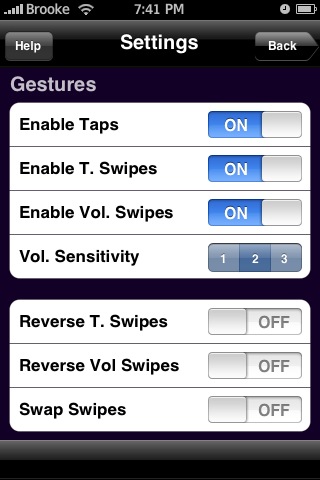
 The update to PocketTouch makes only one visual change to the application and that is the addition of a Volume Sensitivity option in the Settings menu. This allows you to choose between three levels of sensitivity; 1, 2 or 3.
 1 being the most sensitive and 3 being the least sensitive. 1 is the least sensitive, 2 has twice the sensitivity and 3 has three times the sensitivity of 1. There were also some bug fixes, enhancements and added language translations. See complete change log below. PocketTouch is avilable through the BigBoss source.
1.4 Change Log:
• Completely reworked volume controller. This answers a long time request for more constant volume control while eliminating an anti-deafening safety net I had in place in all previous versions. Incidentally, this method uses much less math, resulting for a more snappier feel to the change. And while I was at it, I fixed the “bug” (read:laziness on my part) where you had to lift your finger completely off of the screen before changing swipe direction.
• I have also improved performance by ~400%, thus prolonging battery life.
• I have added in Localization support for several languages:
1. Chinese (Simplified and Traditional)
2. Dutch
3. English
4. French
5. Italian
6. Japanese
7. Polish
8. Swedish (Skylar emailed me and said this translation was added at the last minute).


 Loading...


 Loading ...
I jsut want to point out that if the app doesn’t open up for you the first (or subsequent) time, please keep trying. Just like Customize 1.x, it does a lot while initializing for the first time. The only problem is that SpringBoard will only do so much during startup before it bails on the app.
It shouldn’t take more than a few tries (for most, it will work right away).
Also, Brooke, you got the sensitivity backward. 1 is the least sensitive. 2 has twice the sensitivity, and 3 has three times the sensitivity of 1.
Opps…sorry about that! I think I was looking at it from a different perspective!
Hey, btw…I didn’t not have any issues with the app opening the first time! I think you got it all worked out.
one questin … i installed this app… now it runs in chinese ?
iam german so i prefer the english version, but how i have to change the language i can´t read anything inside the settings
somebody same issue or a workaround for this problem?
sry double post
i changed my language to english, on the iphone general settings. now it´s english,
bug in pockettouch language settings i think!
same problem here. system language is german and pockettouch shows up in chinese. a switch of the system language to english fixes the problem. but after a change back to german pocktetouch is in chinese again…
would be great to fix this bug skylar, cause i love your app!
bugfix would be fine, too.
i switched my language on the iphone, then i made the settings inside the app.
after this change back to german language, paused looked very strange in chinese but the app works. now i can use it
pockettouch works really fine, but my chinese isn’t the best ;-)
Language bugfix 4 Germans…:
(über SSH rein in den Ordner “Programme/PocketTouch/ da sind ein paar Sprachpakete. Englisch (Localizable.strings) kopieren und im Ordner f. Japan “ja” überschreiben… that´s all ;)