Well guys, it is that time of the week again…time for a new QuickTip. I only have a few more quick tips for Safari (really basic stuff like; how to stop scrolling and one-tap zooming on pics and columns). If you have an additional Safari tips that you would like to submit…let us know at QuickTip@appleiphoneschool.com.
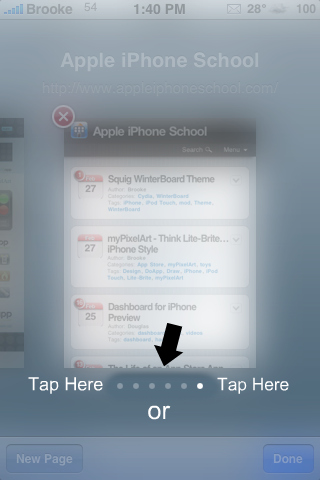
QuickTip – When in Safari tabbed browsing mode, you most likely switch between web pages by dragging your finger on your iPhone or iPod Touch’s screen. However, there is another way to switch between web pages. The alternative is to tap next to the white dots on the bottom of the screen. If you would like to scroll left, tap to the left of the dots. If you would like to scroll right, tap to the right of the dots. So, if you don’t feel like scrolling…you could always give this a try!
Note: This works on your SpringBoard as well.
ScreenShots

 Loading...


 Loading ...
I believe this also works with the homescreens
Not sure if this tip was covered or not but when your at the bottom of a web page, song list in iPod, or any other list and tap the time up top. The page will fly to the top so you don’t have to scroll back to the beginning. It’s awsome when the webpage or song list is extremely long.
Great post.
Generally I don’t read article on blogs, but I wish to say that this write-up very compelled me to check out and do it! Your writing taste has been amazed me. Thank you, quite nice post.