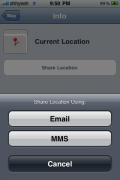
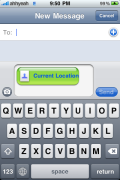
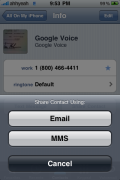
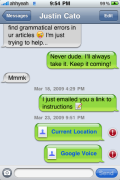
 One of the biggest changes to firmware 3.0 is the app name change from “Text” to “Messages”. The icon was also changed, now with a blank chat bubble where before it had the letters SMS. Of course SMS stands for Short Message Service, which is only texting, but now Messages send pictures, contacts & current location. The icon, along with a few others like the Phone and iPod icons, have a new style shading to them. See the icon at the beginning of this post to see what I mean.
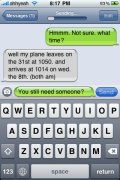
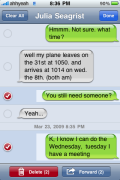
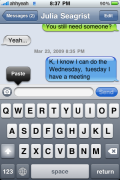
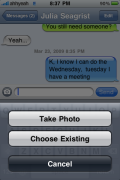
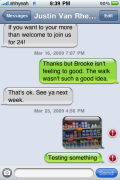
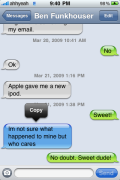
Once open, the top of the app now says “Messages” instead of “Text Messages”. Otherwise there’s not much different on the main menu listing all of your messages. When creating a new text message you’ll notice a new little icon to the left of where you type that lets you add a picture. You can take a new one or use one from your camera roll. You’ll also see the sending progress bar has been moved to the top, only visible when sending, replacing the name at the top. In the top right there is an edit button. This lets you forward messages or delete individual or multiple messages. Of course, you can also copy text messages and paste in this app.

 Loading...


 Loading ...
I was wondering if there was going to be landscape for messages?
Yes, there is. We’ll add that to the post. Doug wrote about it in his first firmware 3.0 article. There is a screenshot there.
How did u get the message.app??? Nice review. Hope to see more!
He upgraded to iPhone OS 3.0.
How come some of the messages are blue? Obviously it’s not jailbroken, so does it just have something to do with the copy/paste?
yea wen u hold on any message it turns blue ad the copy option comes up..
lol, I think it’s hilarious that you have the 3.0 beta and you think ‘one of the biggest changes’ is the icon and text below the SMS application
Dude read the tittle they are only talking about the sms app not the 3.0 firmware in general!
my reaction excactly, sounded a bit amateuristic
I didn’t say the icon and I mean the entire change to the app from being just a text messaging to now being a multimedia messaging app. Sorry for the confusion.
Are you having success with the MMS? I know someone who cant get it to work.
I have not gotten it to work but I haven’t tried talking with AT&T yet.
Doug – just curious if you had contacted AT&T about the mms yet..?
this is really cool. =p
thanks for the previews!!
my “gravatar isnt showing up =[
I can see your Gravatar! and thanks!
I cant wait for apple to release the 3.0
it seems very cool i am actually debating if I will jailbreak or no (I think I would lol )
what does the exclamation mark mean??
error sending
hey great review!
It seems I am liking more and more the 3.0 software. I will still jailbreak it once the dev team cracks the final release. Sorry but I need my themes and sounds and many many ringtones and whatever other miscellaneous app (like SBSettings) that will be updated for the jailbroken Cydia store. :D
Me too!
Did you lose all of your 2.2 messages when upgrading? I want to upgrade, but I dont wanna lose any of my contacts, sms data.
They stayed.
Yesterday there were 32 comments here. Today 14 or 15. What happened?
Are you sure you’re not thinking of the other article: http://www.appleiphoneschool.com/2009/03/22/testing-firmware-30/
Probably…
I LOVE that now we’ll be able to erase individual messages!
I save my lots of gf’s msgs for sentimental value but I also get stuck with random “I’ll be there in 5 mins” or “Call me” messages! :D
Something that should be taken into hand is that there is no MMS on iPhone 2G or stereo bluetooth. All of the features of the new Messages app are there but you can’t actually send files. Something that surprised me was that on my 2G in the settings for Messages there was a MMS on and off switch but nothing actually happened when I flicked it to on.
yeah.. I noticed the same thing… I have a switch in /settings/ for it.. but no ‘new button’ anywhere…
If you do an upgrade to version 3 all your data stays…Although you wont be able to access youtube.
If you want to access youtube you have to do a restore to version 3 and set up a new iphone then resync.
It’s actually a nice upgrade and I am finding it pretty stable.
I upgraded to 3.0 and I can access YouTube.
I think it’s a bit hit and miss, but from reading the Iphone dev forum. They are having more success with a fresh install.
U may have just lucked out :)
hi, could you please tell me where i can download a beta 3.0 for iphone 3G, because i currently have the 3.0 beta, but there is no icon of camera in the bottom left corner!! i think i have installed iphone 3.0 for 2G :-( could you please tell me where i can download and install an iphone 3G firmware? thank you
Hi i also have the 3.0 beta 3G and there is also no camera icon in the new messaging app.I think you have to hack the phone carrier to enable mms.
Not true, there is a camera there without Hacking in the messaging app.
I hear the talk of mms but with this can you send sound files, slide show, or the jpegs that move? These are things that regular mms does and swirly has done for me. Yup I am AT&T coustomer and have had swirly mms working form day one and it’s still going strong. Haven’t yet got on them for the wives phone that I got her a couple months ago. Keep up the great work and congrats on the newborn.
How are you able to get swirly MMS on AT&T to work, I have 2G on T-Mobile and have never had a problem, but I tried and tried and tried to get Swirly to work with my sis IPhone 3G and can’t get it to work….
why do you show 3.0 previ but is not avaible yet
when i can upgrade firimware 3.0 ? can i upgrade my 2G 2.2.1 to 3.0?
Hi there: I read that I wont be able to use MMS on firimware 3.0 on my iPhone EDGE; I would like to know why Apple do that if I can sent MMS with SwirlyMMS…
Thanks
When u sign up for iPhone plan AT&T automatically blocks mms. I have 4 lines a demanded that it be in blocked cause I pay for unlimited messgeing for the whole package. I demanded corporate names and numbers as well telling them they had no right to block something I pay for.
Are there different folders for text messages that come in…meaning can you separate work texts from personal in different folders or menus in the texting feature of the iphone?