 |
Available In: Cydia |  |
Price: Free |
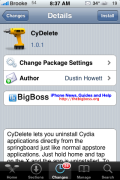
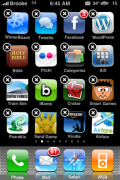
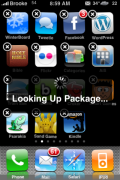
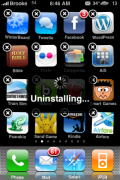
 CyDelete is an application that allows you to delete Cydia application right from your SpringBoard….just like you would an App Store application. To use the applicaiton, just tap and hold your icons until they start wiggling and then click on the X in the corner of any Cydia application. It will then look up the application and give you a pop-up asking if you would like to delete the app. If you select Delete, it will then say uninstalling and voilà…it uninstalls! Personally, I like this mod…it is so much faster than going into Cydia, finding the application, clicking on it, selecting modify, selecting remove, selecting confirm and then waiting for the app to uninstall! You actually used to be able to do this same thing using Kate (I miss Kate). Screenshots below.


 Loading...


 Loading ...
“…it is so much faster than going into Cydia, finding the application, clicking on it, selecting modify, selecting remove, selecting confirm and then waiting for the app to uninstall!”
I have to agree! sometimes I just want to quickly remove an app out of the SB and the moment all the ico s start wiggling and I don’t see the little X in the corner I remember it wasn’t from appstore but Cydia installed and yes, follow ALL the steps mentioned earlier! :P
how long does it take to for CyDelete app to appear on my phone, its been on sleep mode for more them 10 mins. im freaking out…
They should build this in with the jailbreak pwn default programs install. this is a no brainer app. Works great.
Should be default build in on cydia ;-)
Just awesome extension, must have!
FINALLY!!!!!
what if the app you are about to delete/uninstall requires a respring. does cydelete ask u whether u want to respring the springboard, does it do it automatically or it doesnt respring at all?
Hey can anyone help me out? What is the mod called to display the current weather info on the status bar? Also, if you look 3 articles previous to this, it is about that black theme and one of the screenshots of the lockscreen shows new text messages and email in the same bubble. What is that mod called? Thanks guys!
Just install weather icon from cydia, go into settings and enable the weather in the status bar.
This is pretty cool :D
I agree this is long overdue!
I cant find this in Cydia? What am I doing wrong?
I figured it out.
did you install bigboss?
Great app. Now if we can delete apps directly from Category.
Gahh, Last night I upgraded a bunch of stuff from Cydia, and today I try to open my phone, Crash! everytime, restart, crash. Super IPhone /fail. Anybody having the same problem?? btw, I love the extension ;-)
I suggest that you restore, unless you know your way around the iphone in ssh well.
Hey guys, I just installed this and BlankNull, but have no idea where they’re installed. I checked under Tweaks in Supreme Prefs – it’s not there. Am I missing something?
Forget about CyDelete – I didn’t realize it’s activated after springboard restart. So how do I access BlankNull?
BlankNull is a tweak that disables your blank webclips, it does just that, no icon for it. Now you don’t have to worry about hitting a blank icon that would launch Safari.
Oh.. ok. I thought it’s an app to create blanks. Thanks!
Has any one else noticed this problem.
I just recently installed CyDelete and used it to delete mobile finder. It seemed to work as there was no icon of it and it was not installed in either Cydia or Installer. However when I synced my ipod to my computer, Finder came back. Apparently iTunes somehow installed mobile Finder back onto my ipod. WEIRD!
Yep just for confirmation I tried this with two other apps. iTunes re-installed both MxTube and Winterboard.
Okay I feel really stupid replying to my post several time but no edit button :p. Anyways I found that itunes only puts the icon back on the ipod as when I try to open the app it crashes as if there is no files in it.
I think its great having cydelete on your iPhone
One thing I noticed is that if you, like me, using just 1 screen, I noticed that it overlaps at least 6 or 7 screens.
Well, I thought to be clever and remove what I don’t need and starting removing the rest of the other screens, which didn’t cotain icons.
After restarting I found they where back again, using space I don’t need anyway.
Using the dock in springboard I put there what I use occasionally.
Hope a update of cydelete will rectify this; if find it rather annoying
it’s a nice concept but i like that the cydia apps don’t have x’s… it helps me to distinguish between app store apps and cydia apps… i have so many i forget where some of them came from!!
i removed cydelete from my jailbroken iphone 3gs 3.1.2 and now i want it back again and i typed cydelete in cydia,search tab but i didn’t find anything.wat should i do to get it back again? also, now when i go inside the more package sources and click on anyone of the sources, it says can’t locate package.
can anyone help me out please!
i cant get this dumb app it isnt in cydia now i have to do the whole long freakin prosses. liers!
I am having a problem with my cydia. Can I delete cydia using cydelete and reinstall cydia from lime rain or green poison
Generally I don’t read post on blogs, however I would like to say that this write-up very pressured me to try and do it! Your writing style has been amazed me. Thanks, quite nice post.
Where exactly might I find CyDelete
Hey guys, cydelete isn’t showing on my cydia…I don’t know why, but when I type in “cydelete” in search it did not show up….why?!? Someone please answer! Help me! I really need to delete some of the cydia apps…..
This internet site is my aspiration , really fantastic pattern and perfect articles .