 |
Available In: Cydia |  |
Price: Free |
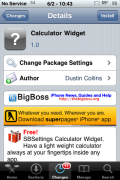
 Calculator Widget is an application that adds a Calculator to your SBSettings toggles. I honestly delayed on checking this on out because it didn’t seem too exciting but, once I checked it out, I realized that this could be a very helpful widget!
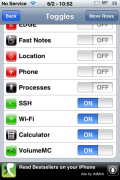
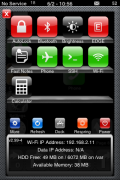
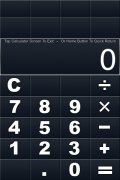
Once installed, you will need to go into SBSettings, the More option and then the Set Toggles option and turn on the Calculator. When you select the Calculator “toggle” in SBSetting, it will open a calculator. It is not the stock calculator it is a much more simple calculator. However, there is one thing I really like about this widget. If you tap the Home Button when you have the calculator open, it will go back to your SpringBoard however, you can then tap the Status Bar and it will bring the calculator back up. This is nice if you are in an email or Safari or your notes and trying to do some calculations…it allows you to quickly switch back and forth!
If you want to complete close the calculator just tap on the calculator’s screen and it will go back to SBSettings. You can get this simple, yet useful toggles via the BigBoss source. Have I told you that I just love SBSettings!! Well, if not….I just love SBSettings!

 Loading...


 Loading ...
You forgot to mention that the calculator isn’t good. : ( You can’t just type in a series of numbers, hitting plus after each, to add up a list. You must hit =, then +, after every number.
Yep…you definitely have to hit = after you enter a number. Maybe we will see an update that will change that. It is a very simple calculator!
This is pretty helpful! SBSettings is probably the best app for the iPhone! You just don’t realise how good and useful it is! :)
LOVE the calculator widget but where’s it gone?? Can’t find it in cydia or BigBoss anymore – just trying to reload after upgrade. : (
Me too !
Download the deb file from here:
http://files4.thebigboss.org/repofiles/cydia/debs2.0/sbs_calculator_1.0.deb
Copy to your phone using iTools or iPhoneBox or similar free app to:
/var/root/Media/Cydia/AutoInstall and reboot. Et voila!