 We are getting emails from people asking how to get SSH to work on the iPhone 3GS. The only thing that is different is that you have to change the File Protocol to SCP. Below are step-by-step instructions.
1. You will need to have a jailbroke iPhone or iPod Touch in order to SSH into your iPhone or iPod Touch. For more information on Jailbreaking, please see our F.A.Q. Page.
2. When you jailbreak your iPhone/iPod Touch, the Cydia application will be added to your SpringBoard with the rest of your applications. You will want to go into Cydia and search for the OpenSSH application. If it is not already installed, you will need to install it.
3. Then you will need some type of SSH client installed on your computer. WinSCP is great for PCs. Macs come with openssh but if you’d like some alternatives check here.
4. To sign into the iPhone, the Host Name is the iPhone’s IP address which you can find by going into your Settings application on your iPhone (or iPod Touch) and then into the Wi-fi option, click on the little arrow next to the Wi-Fi you are connected to and find the IP address. The username is root and password is alpine (no capitals). Don’t worry about the Private key file, you don’t need to put anything there.
5. On an iPhone 3GS, you will need to change the File Protocol to SCP. The default is most likely SFTP. Just select the arrow next to the option and select SCP.
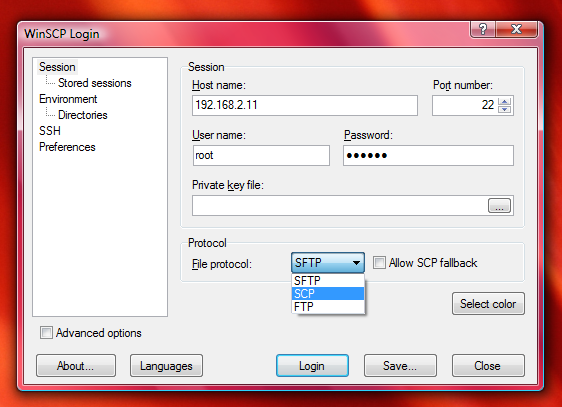
6. Hit login.
Helpful Hints:
– The first time you connect it takes longer than usual, about 30 full seconds.
– Your iPhone must stay turned on, so disable autolock
– Your iPhone and computer must be on the same network, ssh connects via wifi on the iPhone.

 Loading...


 Loading ...
hi it looks like on cyberduck (on a mac) there is no option to choose scp
and when i choose sftp it says unexpected error
any advice on what i should do?
Try http://rsug.itd.umich.edu/software/fugu/download.html
Have not tested as no 3GS only 3G but loaded and does have the option for SCP
Corkman
I also can’t get it to work on cyberduck. I’ll let you know if I figure it out.
it works however it i don’t’ know how to activate the browser for the iphone on this application
You have to choose SCP to ssh into the iphone 3G as well, so no difference really?!
I ssh into our all our iPhone 3G’s with SFTP.
Exactly, use SFTP on all other iPhones
I don’t mean to be disrespectful, but the high school I attended was really strict when it came to the English language. Brooke, you keep referring to “jailbroke” iPhones. The way to say it is “jailbroken” iPhones. Sorry, no contempt intended, it just bugs me.
Hi,
I have jailbreak my iPhone 3gs through Cydia and removed Cydia from my iPhone. Now the problem is I have installed download manager lite onto my iphone and have downloaded couple of videos. Is there a way I can transfer those videos onto my PC. Please help!
Hi,
I have a jailbroken iphone 3gs, openssh use to work just fine for me
without having to change protocols
But now i just keep getting this error message saying server closed connection unexpectedly.
I am not sure what caused this, i have tried to install a program to use iphone as a hard drive which required me to install a plugin called 1-ac….. “not sure of the name.” but then i un-installed all of this.
anyways, i have restarted and restored and reset my iphone a fair couple of times, but, with no luck!
any idead??
Get a new iPhone 3GS jailbreak with Cydia.
Already istalled OpenSSH from Cydia in iPhone and WinSCP in PC.
Try to Login BUT always get ” Error — Time out “.
Looks like cannot connet to my iPhone.
Already change Protocol to: “SCP” as mentioned.