 |
Available In: Cydia |  |
Price: Free |
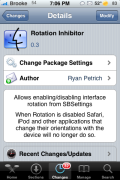
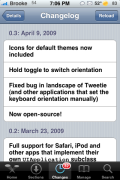
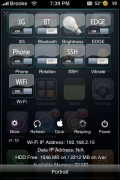
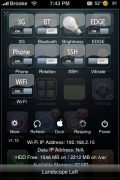
 Today there was an update to Rotation Inhibitor, a SBSetting add-on toggle that allows you to turn of the auto-rotate feature on your iPhone or iPod Touch. The update does a few pretty cool things. It adds the Rotation icon for all the default SBSetting’s themes (which is nice!), it fixes a bug in which the keyboard was not working properly in apps that set their “keyboard orientation manually” and it made the app open-source. It update also added a new feature to the toggle that allows you to set which rotation orientation you would like to turn on.
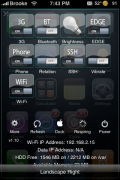
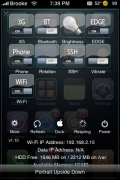
When you tap and hold the toggle (within SBSettings) you will notice a little pop-up at the bottom of the screen with one of four options displayed; Landscape Right, Landscape Left, Portrait and Portrait Upside Down. This allows you to choose which orientation you would like your iPhone or iPod Touch to stay on. So, lets say you turn off the rotation toggle (which will turn off the auto-rotate feature) and then you choose Portrait. That means that everything will be displayed in portrait view…and will not rotate out of portrait view. If you select Landscape Right everything will display in landscape view in which you have to turn your device to the right in order to read it…and it will not rotate out of that view.

 Loading...


 Loading ...
is there anything like this for non jail broken phones??
Not at the moment. It’s unlikely to appear in AppStore.
I have never been able to get thistoggle to work properly, I have other toggles that work just fine, but this one keeps rotation active no matter what it indicates.
Any ideas, I’ve tried removing the toggle and sbsettings and starting from scratch. Just trying to see if I should be waiting for an update as most an toggles usually need one
Hey, Doug and Brooke, Apple is having an app contest you might want to write about.
http://www.apple.com/itunes/billion-app-countdown/
Writing it now! Thanks for the tip!
What smbprefs theme are u using? I like it!!
He is using Glass Theme. Just search it in Cydia also, here’s a Sbsettings theme guide http://www.appleiphoneschool.com/2008/11/19/sbsetting-themes/
what sbsettings theme r u using? it’s cool
Was this removed from Cydia? I can’t seem to find it anymore since the release of 3.0.1
Your app is so great i have been waiting for it for a long time thank you
I really want this app to be availible in the app store. I would pay for this app!!!!!!
Our auto repair shop in Blaine, MN proudly serves residents in the areas of Fridley, and Spring Lake Park, Minnesota.
However, the thing to keep in mind is that the lifts should be able to handle weight o the vehicle.
Just call Locksmith Spanaway and our team of expert
technicians will respond to your needs and concerns in 15 minutes.
Nevertheless, secured automobile loans are generally brief time period loans.
According to the US Bureau of Labor Statistics, employment for automotive engineering jobs will grow as fast as the average of all other occupations through to the
year 2014. Car covers will protect your paint and car surface.