 |
Available In: Cydia |  |
Price: Free |
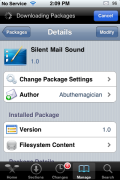
 Silent Mail Sound is a mod that will turn off your mail notification sound but, will still have your device vibrate when you receive a new email. I’m not really sure why you would need this mod. I guess if you do not want to put your entire iPhone into vibrate mode but, you still want to know when you receive an email without the sound notification…then you might use this mod!
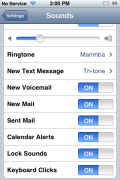
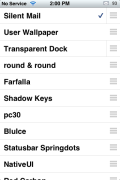
When you install Silent Mail Sound, it is added to WinterBoard where it is then activated/deactivated. In order for the mod to work, your New Mail sound notification (located in your Setting application under Sounds, New Mail) must be turned on. However, once you activate the Silent Mail Sound mod in WinterBoard, it will automatically disable the sound and replace it with vibrate. If you have the New Mail sound notification turned off in your stock Settings application, the Silent Mail Sound mod will not work.
I’m not sure that I can think of a scenario in which this would be used….maybe during a business meeting? But, wouldn’t you have your entire iPhone on vibrate during a business meeting? Let me know in the comments if you can think of a reason for this mod.
You can get this mod via the BigBoss source.

 Loading...


 Loading ...
Perhaps this mod is good for this scenario:
I have a “blank” ringtone assigned to my calls and text when I’m going to the theater … during the day. However, I’m waiting for a particularly important email during this “downtime.” So, just in case that email comes through I want to know (by way of a vibrating alert), so I can act on it right then and there. In the meantime, I’m not taking any calls or text messages (so those won’t sound/vibe) while Megan Fox is onscreen during Transformers 2.
Twitter: OakleyOC
cant you just put your iPhone in silent. This app is a waste of space guys.
I would like the opposite of this app. in a sense.
I would like a mod that allows all other system events to vibrate (phone, SMS, etc.) when the vibrate switch is activated but NOT e-mail. I’m OK with the iPhone vibrating when I get a phone call in a meeting but I want it to stop vibrating every 20 seconds or so when a new e-mail hits.
Chattermail on the Palm used to allow for this…
This mod is great for almost every scenario. Wouldn’t it be great that the speakers in the iPhone didn’t suck!?! Sure!, we can all change into a ringtone that’s really loud. But what about other sounds, like email perhaps?
While walking in a mall we can hear the ringer, but not the email sound.
I submitted one of these to bigboss (maybe even this one). I liked my phone to vibrate when I got a new mail, but didn’t want to hear the annoying tone when my ringer was on.
Hi,
I have iPhone 5, and latest update of iOS 6.
My iPhone settings to receive an email alert and a sound while in lock screen or home screen mode have been verified as correct by an APPLE senior advisor and at the APPLE store.
When I send an email from my IMAP Charter Communications PC desktop to my iPhone, I get an alert in lock screen mode or home screen mode, but no sounds.
When I repeat this process by sending an email from my PC to my Gmail account on the iPhone, I get an alert and a sound in lock screen or home screen mode.
If I set up a POP account on iPhone and on desktop and send an email, I get an alert and a sound in lock screen or home page mode (but I can’t use this system because Charter does not support outgoing server settings for the iPhone 5).
I’ve repeated the above after reboots, restores, iOS uninstall/reinstall, and APPLE issued me a new phone, but have the same problems. They’re stumped.
Can anyone offer any suggestions as to what is going on?
Thank you for considering this.
This helps atrophied muscles to regain their strength and tone.
Create and use an email address at your
business domain name and post that on all of your marketing materials and use
that in all of your email correspondence. There’s an increasing reliance
on user-generated support forums, which leads us to believe that Microsoft is
shying away from its own live technical support.