 |
Available In: Cydia |  |
Price: Free |
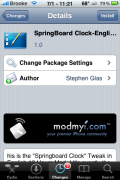
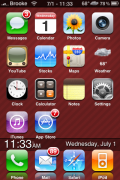
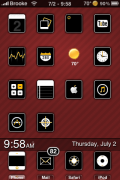
 This mod was originally released in a different language however, it was then re-released in English called SpringBoard Clock-English. What the mod does is add the Date and Time to the bottom of the SpringBoard where your page dots normally are. It looks the best if used with smaller icons. If you are using the stock size icons, you can turn on the Transparent Dock mod, and that will allow the SpringBoard Clock to fit a little better. The application package also includes an html file if you would like to ssh in and do some of your own customizations to the mod…it is located in the Library/Themes/Springboard Clock – English.theme folder.
The mod comes with a wallpaper that I can’t seem to change using WinterBoard which means you would have to ssh in a different wallpaper if you would like it changed. You can get this mod via the modmyi source.
How to Install
1. Your device must be jailbroken. (how?)
2. Make sure you have WinterBoard installed via Cydia.
2. Make sure you have the modmyi source installed in Cydia.
3. Search for SpringBoard Clock-English in Cydia, run the install.
4. Open WinterBoard and activate the SpringBoard Clock-English Theme.

 Loading...


 Loading ...
i hate how i cant use my own backround without sshing
Winterboard works great for this….at least for me
i got a weird date donnerstag, 2. juli how can i chance it to english
nevermind didnt spot theres an english version aswell :(
You have to download the English version – “SpringBoard Clock-English”, not “SpringBoard Clock”.
how did you get the date and time up top Brooke ?
U can get the date and time by using the “more” button on SBSettings. From there hit the “Extras & options” tab. Then set the Statusbar Date toggle to on.
Ha. Thanks man!
I have done a Update to this mod!
I already sent it to modmyi, so it will come in few hours! hope you like it now better! Also i want thx Larry for this post! Maybe my Mod will become many users…
stay tuned =)
Awesome! It really is a great mod! To only have the full date on the lock screen is ridiculous. If only Apple wasn’t so closed-minded…
Thanks a lot!! With the update you can now choose your own wallpaper!
WIll this show on all pages or just one?
i would like to show on just the first page
So, why would the Springboard Clock – English.theme folder not be in Library/Themes? This is the second time I’ve noticed a folder not being in there when it is being used.
I have the theme on in Winterboard. Any ideas? Or where it MIGHT be instead of there?
New Version is available! =)
Hi how do you put your own wallpaper in? Do you have to use ssh or is there another way?