 |
Available In: Cydia |  |
Price: Free and $8.99 |
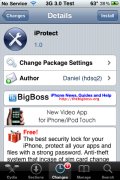
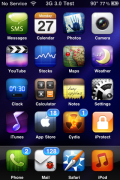
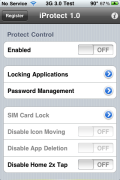
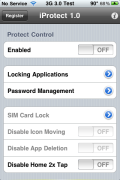
 iProtect is a recently released security application for your iPhone or iPod Touch. It allows you to password protect applications, lock your SIM, disable the ability to move icons around on the SpringBoard, disable the application to delete application off the SprigBoard and the ability to disable the Home Button double-tap.
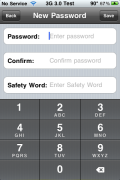
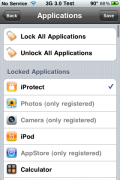
When you first open the application, you will need to enter a password and a security word. Once you are in the application, you can choose to lock All Applications, Unlock All Applications or choose to lock specific applications. You can lock both App Store and Cydia apps.
Once an app is locked, when you tap on the app on the SpringBoard, you will be required to enter a password in order to open the application.
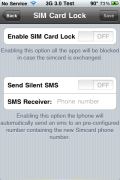
The downfall with this application is that many of the options are not available unless you purchase the application. You are unable to use the SIM lock feature, the Disable Icon Moving feature, the Disable App Deleting feature and you are not able to lock all the important apps (App Store, Cydia, Mail, Phone, Messages) without purchasing the app for $8.99 USD.
Honestly, I’m not sure why you would purchase this app when you can use Lockdown for free. The only difference is that iProtect allows you to lock your SIM… though, I’m not sure it is worth $8.99. You can get iProtect via the BigBoss source.

 Loading...


 Loading ...
Um, I’m almost sure you meant to say that this app was available in Cydia, not the App Store. Just making sure that’s right.
Yes, sorry about that.. I changed it. It is in Cydia not the App Store.
ur right about this app y pay $9 just to lock sim, i think person who develop this app wasted his time, he/she should have used his time and effort in creating something different.
Wait… Is it in the app store or cydia?
It just looks like an copy of LockDown, even the UI. I like LockDown and best of all its free! Only problem is that for the first time of turning my iPhone in and entering my pass code for Messages it goes into Safe Mode. After that its ok until another reboot.
in cydia.
How do you register iProtect once you pay for it??
Good question. They charged my credit card but never sent me a registration key.
Just can’t beleive that I paid $14.99 for Madvlock. This app does the same thing for alot less. I’ve been had.!!!!
iProtect is not bad. But I personally think that they need to do an update. Right now, let’s say you opened up your photos that was pin protected. If you turn your screen off, you can still turn it back on and see the photos. They need to fix it to where it ask for the pin again to access what ever app you have protected. Really, setting up the lockscreen with a pin, that can get pretty annoying. It’s easier to just lock individual apps. Other than that minor flaw, everything else seems to work great!
New version of iProtect, 1.1. Still dont lock apps that is in a category. And when app is launched in spotlight the passcode “window” is hidden by the spotlight keyboard.
Agree – iProtect is not bad – It can be registered for the Touch whereas mAdvLock will not allow registration of Touch only iPhone – Also cheaper than mAdvLock – However biggest issue is if you switch off while in an unlocked app, when you power back on that app will still be opened – YIKES! – not too secure with that glitch – but so far that’s only glitch I’ve found using it.
wr can i download mAdvlock ??
I have sold my iPhone and bought a new one. Now I want to instal the full version (which I already paid for) on my new device.
Two days ago I asked the developer for a new activation code, No reaction from him so far. This is poor.
Same thing from me. They charged my credit card, four days later I’m waiting for my activation key.
I installed free version on iphone 3g (3.1.2) and set passcode for a couple of apps. Then I uninstalled iprotect and it got removed without even asking a security question. After a respring, the previously blocked apps were freely accessible. What a waste app..!! Waste of time and effort..
I purchased iProtect thru Cydia via PayPal. I received an email with an activation key for my iPhone 3G but it didn’t work! I also noticed in the automated email reply that the serial number theymentioned did not match the serial number for my iPhone. I have emailed the developer six times about this problem (or glitch in their system) but up to now they have never replied to me. Very bad. I have no way of activating the app and I’ve lost money with them. I feel like I have been swindled! I investigated further and found on the web that the developer is based in Brazil??? (I believe crime rate over there is high – I hope I have not been victimized by a scammer)!
I am at a dead end. I tried launching a dispute with PayPal and they say that they only cover products that are actually shipped and not products that are electronically purchased (????). Bummer! So people beware! Don’t purchase this iProtect app anymore as you might end up swindled like me where I get sent an activation key that doesn’t work!
Don’t EVER use paypal unless you use your credit card. Paypal is notorious for ignoring/refusing customer complaints. Your credit card company will give you an immediate (conditional) credit and then take up the fight with paypal (& if you have any kind of case – paypal will lose!). Ever wondered why the default payment system in paypal is direct withdrawal from your bank account? And that when you select change funding source to credit card, they beg you not to change?!?
Anyway, back on topic, iProtect 1.2 is a big improvement. It’s worth the price IMHO. Lockdown may be free, but it’ll crash your springboard every 5 minutes :-(
I got a problem with this app. I installed this app a long time ago. Now I forgot the password. so I uninstalled iprotect. But then applications locked by iprotect are still locked! Help, how should I disable iprotect to unlock my locked apps.
u better unjailbreak again..haha…
then rejailbreak …oops!!
I have a huge problem. I downloaded the app, and I locked all my apps, but I never set any password. Now it wont let me get into any of my apps! Is there anyway to delete iProtect? I need help! PLEASE!
hi, i would like to know if you got this issue resolve, because i have the same problem right now, i hope that you may be able to help me on this..
hey guys i install iprtoct from cydia
i ahve 4.0.1 firmware
but he want register key can any body tell me the key for register
thnks for help gys
after you pay for the full version, you will be sent a activation key.
Not true. I paid for the full version. They charged my credit card, but never sent me an activation key. I’ve sent them four emails now, with no response.
wats the theme u r using????
HELPPP
I bought this tonight and where do i get the activation key…i got an email from paypal and only got the register key which doesnt work…help please
i have the same problem. Has anybody a sugestion what to do…?
ok so i found a security breach! if you lock the sms application it forces you to input a password.. normal.. but you can still go to contacts and go to sms from there for each individual contact..could you make it lock that too without having to lock the contacts app?
I’m using iProtect 2.0. I want to apply the application on Video icon, but not able to find video icon on the application list. What should I do? helpppp
umm i forgot my password for iprotect how do i unlock it
I have a huge problem. I locked all my apps, but I never set any password. Now it wont let me get into any of my apps! Is there anyway to delete iProtect? I need help! PLEASE
CAN ANYONE HELP ME? I CANT REMEMBER MY IPROTECT PASSWORD AND MAGIC WORD. HOW DO I REMOVE OR REINSTALL THE APPLICATION? I REALLY CANT REMEMBER CONFIGURING MY PASSWORD ANG MAGIC WORD
If you didn’t configure your password, try entering an empty password (maybe it will work, otherwise it may be a bug).
If you actually set a password but forgot you did and you need the password to uninstall it from Cydia, there’s nothing you can do. If it’s possible to do this the application is meaningless since it wouldn’t protect your phone from strangers uninstalling it.
Google to see if there is a hack for your problem… The ultimate solution is to format your device and jailbreak it again. All information not backed up will be lost. Good luck.
i paid for this app, they havent even sent me the activation key
DO NOT BUY THIS APP!!!!!
I PAID FOR IT!!!
AND STILL NO ACTIVATION KEY!!!!!!!!!!!!!!!!!!!!!!!!!!!!
yeah these folks is just takin your money
I just bought this app and got it all set up. Everything seemed great until I realized the security is very easy to bypass. For example, all web applications are locked. However, if you go to a text message that contains a URL and tap it, it opens in Safari without requiring a password. With Mail locked, I was also able to use another app that sent something as an e-mail without needing a password. Not good.
Oh yeah, another security problem example is alerts. I had Textfree locked but Alerts turned on. When I got an Alert saying I had a message with a button to view the message, clicking the button took me into Textfree with no password prompt.
i had iprotect but now i forgot my password how can i get another password
please if you can help me with registration key for call clear 3.2 version . i have install the application call clear from cydia , but it is is asking for activation key . from where i can get this applicatipn key .
please help me
Same problem, i buy the application but i never receive activation key
Iprotect
Iprotect is a scam they charged me $8.99 and never sent the activation key! Don’t buy it
i had iprotect but now i forgot my password, now what should i do
I forget my iprotect password
Can you help me for solve it or delet it?
Please
I loaded Iprotect, enabled it and pressd the home button. Now it’s locked and I hv no acccess to any of my apps nor I cn delete it. Please help meeee
Can one use app. for other phone?
hello guys
i forgot my iprotect password is it any one can help me to open that ???
iprotect is a awesome app. however, i’m experiencing problem with silent sms feature if sim changed. iprotect is sending regular sms to my other specified no. even after inserting my original sim card evry time i respring. this is costing a lot of money. anyone help pls… wuld appreciate.
i forgot my password for iprotect how do i unlock it?
Can you help me for solve it.
That great now how do I get rid of it when I forgot both passwords? DX I need it ighhte away!
Hey that is good
Wonderful blog! I found it while surfing around on Yahoo News.
Do you have any tips on how to get listed in Yahoo News? I’ve been trying for
a while but I never seem to get there! Appreciate it
amazing insight. Really enjoyed looking over this blog.
Keep up the good work and to everyone keep on learning!
Hi there, You have done a fantastic job. I’ll certainly
digg it and personally recommend to my friends.
I am sure they’ll be benefited from this web site.
I absolutely love your website.. Very nice colors & theme.
Did you develop this web site yourself? Please reply back as I’m looking
to create my very own blog and would love to know where you got this from or what the theme is named.
Kudos!