 |
Available In: Cydia |  |
Price: Free |
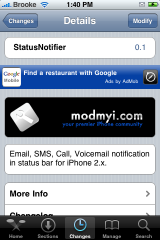
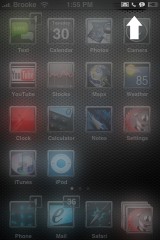
 Now, this is an application that many of you have probably been waiting for!! I personally use IntelliScreen for my status bar notifications but, if you do not use IntelliScreen…this is perfect for you! StatusNotifier adds an icon to your status bar (the bar at the top of your iPhone with the carrier logo on it) if you have a missed email, text, call or voicemail. This is very similar to the Taskbar Notifier application for firmware 1.1.4 and below.
StatusNotifier is a code application so, when you install it there will not be an icon to your SpringBoard and it will automatically start adding the notification icons to your status bar.
I had no problems with the application. It began working immediately and I received notifications for missed calls, voicemails, texts and emails. Definitely a nice application to have on your iPhone! Check
out the screenshots below to see what the notification icons look like.

 Loading...


 Loading ...
hmmm… not working for me:( iphone 3g with 2.1
I am running 2.1 with day one iPhone. I had to turn the phone off then on after installing to get it to work.
FINALLY! man intelliscreen is just too much crap for me to handle and this was the coolest part so I am stoked this finally got ported for 2.x firmware
OT: Brooke what theme are you using for those icons in that screen shot?
Thanks!!
Yeah what theme do you use its very nice is it for winterboard or selfmade,please tell us!!!!
I liked the theme too. What´s the name? Tks :)
Finally. I installed intelliscreen just to have this feature but I really dislike intelliscreen. Anyways, now I can have my good old taskbar notifier back!
Does anyone know what source it is from? I have almost every source available and I can’t find it. Please contact me at canducin@yahoo.com if you know.
It’s part of Erica’s source. You should have it by default
Not work :(
Yeah. WHAT’S THE NAME OF THE THEME IN YOUR (BROOKE) SCREENSHOT?? IT’S VERY COOL. I WANNA HAVE IT
I think the theme it’s call brilliant if I’m not wrong!!
You’re not wrong. Thanks man
thanks bro, your not wrong
does not work on 2.1
it works perfectly on me and im on 2.1 firmware and on a iphone (not 3g) wats ur problem since it dosent work? maybe a could help u
i like the wallpaper the developer used you can see in cydia. what´s the name? where can i find it?
its in cydia its called brilliant
don’t mean brilliant. I’d like the apple wallpaper
Works well for me. (2G iphone with 2.1 jailbroken) So happy finally have this feature back. Big thanks to whoever developed this.
It installs fine for me, but the “new mail” notifier never goes away. I tried it out with SMS, and that seemed to work fine.
It’s a good start for a 0.1 release.
I have the same problem. Its kinda frustrating. It always says I have a new email. I uninstalled and reinstalled. I power cycled my phone. No luck getting it to go away. Any fixes?
works great on iphone 2G fw 2.1
If it doesn’t work, Reboot.
After reboot it will work, sure!
sms works but not email notifier…
if it’s not working at all for you, make sure you also have erica utilities and sqlite v3 installed via Cydia. Status Notifier needs those to run
For anyone who can’t get this to work, i was having the same issue. Then i installed Sqlite v3. As soon as i installed this, i restarted my iphone, and status notifier was working as expected.
You need to make sure you have both Sqlite v3 and Erica’s utilities installed for this to work. Erica’s utilities should already be installed (this should automatically be installed when you jailbreak your phone). Sqlite might not show up in packages, if it doesn’t, then do a search for it, install it, then restart your phone.
I did install it Brooke but on the screenshot of the status notifier your screen looks little bit different kinda blurry n that’s the info I’d like pls.
there is a problem when You use for example iRealSMS as main Message app not mobileSMS it show message only from MobileSMS app :(
Yeah! Now it’s working – update came :P
It works only half way for me:( Whenever I receive an sms, then I’ll have to wait for 2 minutes for that notification to appear. After I read the sms, I’ll have to wait another 2 minutes for that notification to disappear:( Am I the only one who has this problem?? I’m on 2.0.
I have this problem too
according to the developers google code page the status bar is updated every 60 seconds. You can edit the interval by changing the value in the following file
usr/local/StatusNotifier/daemon.sh
Also the dependency on winterboard issue has been raised as a bug so maybe that will get addressed in an update.
Has anyone got the voicemail part of the program working as it doesn’t for me and none of the installed content seems to indicate it is even a feature (ie no icon for voicemail installed into springboard)?
oh and remember the quicker you make it update the more processor and battery power it will use up.
fab_rick: How do you change it? I mean what program do I need to open that file? And if I use Macintosh, how do I change it? Thanks in advance. I don’t mind if it drains my battery though:D
textedit will do it for you if you download the file to your mac using ssh (follow saurik’s instructions in cydia for ssh file access if you don’t have it already). Then just change the value of the following line at the end of the file
#Delay (1 min)
sleep 60
Change the 60 value to the number of seconds you would like the program to wait before it checks each time.
You can do this on the iPhone with one of the text editors available but it’s more of a pain.
Be careful not to change any of the other lines and good practice would be to make a copy of the original just in case!
Good luck :)
I changed it to:
#Delay (1 min)
sleep 1
and it doesn’t work anymore:( Any ideas? It would be great if you could send me your working file:(
I suggest trying some numbers larger than 1. The new ‘notifier’ app in cydia updates instantly by the way and uses mobile substrate so there is less strain on the battery as there is no daemon running in the background. I’ll test some things out and let you know regards the ‘status notifier’
Say cheese^^ It works perfectly. Thanks fab_rick!!
It also installs Winterboard in the package and when I un-install Winderboard, StatusNotifier is also un-installed. I dont need Winterboard. The Slide to unlock is also changed to Slide to saurick !
What is Jay Freeman upto ???
Has anyone found a way out ?
Ahh the new email icon never goes away! it is the second day now! A bug? Something I can do?
For me too. it’s been 2 days, and the mail icon is there. It started happening after I upgraded.
I tried going through the unread mail in the trash folder, that seemed to have worked for me. But I’m still getting a delay in the SMS icon.
That worked for me. Thank you. If you have any unread emails in any of your email folders it will have that icon in the top.
The update is here…works very well.
Icons come on/leave on time.
okay it works perfectly for me, iphone 2nd gen, 2.2 unlock/jailbreak. i love how it has a little icon when the phone is put in silent mode!!! awesome!! thanks a bunch developers!!!
Does it notify you too when you get a notification on Whatsapp?