 |
Available In: Cydia |  |
Price: Free |
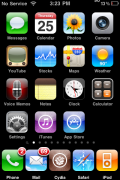
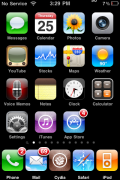
 I have had quite a few people asking me about the LiveClock mod (a mod that displays the current time on your Clock icon) and whether or not it works on the 3.0 firmware….the answer is, yes!
The first time you install the mod, it will be over the top of your Stock icon which makes it look weird because it will have two hour, minute and second hands. All you need to do is go into WinterBoard and disable LiveClock. Your iPhone and/or iPod Touch will respring. Now, go back into WinterBoard and uncheck the LiveClock Disabled option…your device will respring again and voilà you will have the LiveClock mod (working correctly). You can get this mod via the iSpazio source.

 Loading...


 Loading ...
Yes LiveClock does work in 3.0 software as far as the animation goes. However, tapping the clock icon does not open the clock app.
If the LiveClock is disabled via winterboard, then clearly the animation stops but tapping the icon to open the app now works as ever.
I have toggled back and forth many times and the same thing always happens – tried reloading the app several times to no avail.
I have just found out how to get the app to open. Do not tap the centre of the LiveClock icon, but over the word clock. This may be something new although I have always tapped all icons in the centre before to open up the underlaying app.
Sorry If I have wasted anyones time.
You can still open it, it just becomes more difficult… As Clive said, don’t click in the center of the app. The bottom right corner works the best for me.
You can also launch the app via the SearchLight search; search for Clock and then tap on it.
I go into winterboard and I don’t see a LockClock option. I’m not sure if that was mistyped and you meant LiveClock. If so, just like the guy above, disabling and re-enabling does nothing. Each time I re-enable, I get the funny looking clock with six different hands, and can’t click on it to open it. Being able to open it is not a big deal, since I can use Spotlight to open it. I just want an animated clock with only three hands.
What version iPhone are you on? I tested it on two iPhones, both iPhone 3G’s, both on firmware 3.0. I had the same results on both…install, six hands, disable, respring, enable, respring and works.
I have an iPhone 3G. All is working fine now. I installed Winterboard Settings just to see what it was about. Messed with some settings in there, resprung, and voila, LiveClock works. Also, I didn’t like WB Settings cause it didn’t put a check mark next to the themes. So I uninstalled it and LiveClock still works great. And thanks to Clive and Eric for the tip about where to tap. That’s a lot easier than opening it up through Spotlight. Hopefully an update will fix this issue.
Anyone found out how much more battery is used with this mod as well as the weather icon one?
I’m having the same problem. Disable LiveClock in Winterboard. Respring. Enable in Winterboard and I have a clock with six hands.
Yay it works. Of course after installing 3.0 and finding out liveclock didn’t work, I disabled the live clock mobile substrate using the advanced SBS settings.
I tried the steps listed here 5 times and was finding it kind of annoying that it wasn’t working. Then I remembered I had disabled it — so if it isn’t working for you that’s another thing you might check.
You must add Ispazio source to cydia. That will pull the latest version as it is the developer’s site. I was having the same issue as all of you but then I updated the source, disabled and enabled (as described above) and it worked perfectly!
HTH,
Carlos
first generation touch running 3.0 can’t get rid of other clock in background.
i am giving up on this one.
the weather one does not work for me either. ;-(
cassandra
just like Cassandra. Weather one gives me the weather and time in Glasgow, when I am in Paris, so no use, although I like the looks of it and clock is either with lots of hands or doesn’t work
ssh or iphonebrowser to ur winterboard themes and replace the clock with the hands png with an edited one with no hands
thank you so much for this tip!!!!
hi. i tried a number of times the disable/respring/enable, including restore > re-jailbreak > first thing installed was liveclock. i really miss the rolex daytona – will there be a 0.4 or 0.3.1 update to fix the multi-hands issue and liveclock not accepting any themes? any other tips on what I can try to make this work are apprecaited.
tnx.
For iPhone 3.0 without Winterboard: after installing LiveClock go to /System/Library/CoreServices/SpringBoard.app, get LiveClock.png (it’s the clock icon without needle), rename it to icon.png and use it to replace icon.png in var/stash/Applications/MobileTimer.app. Respring and it works.
Touch the icon label “clock” under the icon to start Clock application.
Ispazio source down? I can’t seem to add it…
Same here, all I get is an error message. :(
They updated the source early this morning and all is good now. :)
Fastidious replies in return of this query with solid arguments and
telling everything on the topic of that.
Its not my first time to visit this website, i am visiting this website dailly
and get good facts from here everyday.
If you wish for to grow your experience only keep visiting this web page and be updated with the newest news
update posted here.
Hey I know this is off topic but I was wondering if
you knew of any widgets I could add to my blog that automatically tweet my newest twitter updates.
I’ve been looking for a plug-in like this for quite some time and
was hoping maybe you would have some experience with something like this.
Please let me know if you run into anything. I truly
enjoy reading your blog and I look forward to your new
updates.
That is a great tip especially to those fresh to the blogosphere.
Simple but very precise information… Thanks for sharing this one.
A must read post!
Oh my goodness! Awesome article dude! Thank you so much, However I am going
through problems with your RSS. I don’t understand why I cannot subscribe to it.
Is there anybody else having identical RSS issues? Anyone that
knows the solution will you kindly respond? Thanx!!
Oh my goodness! Incredible article dude! Thanks, However I am encountering issues with your RSS.
I don’t know the reason why I am unable to join it.
Is there anybody having similar RSS problems? Anyone who knows
the answer can you kindly respond? Thanks!!