Live Cams

settings
Available In: App Store       Price: $1.99  

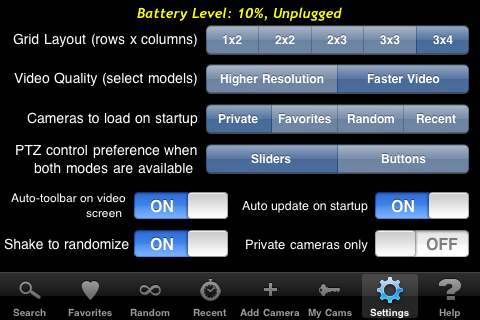
Live Cams Live Cams is one of the few apps that make it right on the front page of my iPhone. I’ll tell you the reason right up front before the entire review. I only use a few of their features but there are many more. So why is it on my front page? Because when opening the app, I can customize it to show thumbnails of the camera’s I’ve added myself. I’ve got it set to show 8 cameras all at once, then I tap on a camera to see it full screen. This way I can monitor all of our cameras at work from anywhere. The reason I can do this is because the app lets you customize what tab gets opened when the app loads.
settings

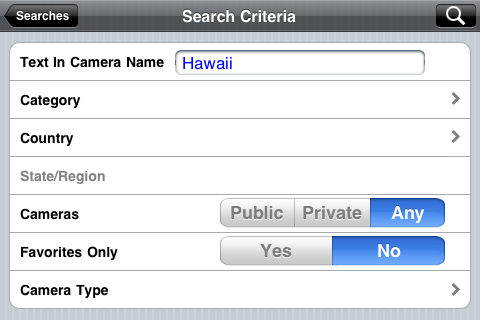
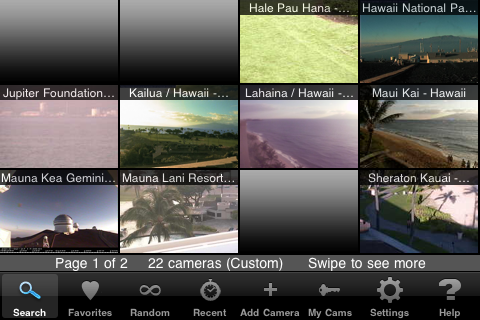
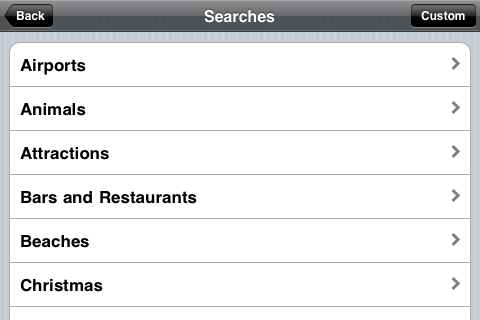
Now for some of the many features offered by this app. The first tab is the search tab. Once opened you see a list of presorted categories of cameras. If you’re looking for a camera in your locations or of a specific topic not on list there is a custom search button in the top right. This is more like an advanced search not just giving you the option to type in your search but from what category, country, state, and more. For the example below, I did a search for Hawaii.

Categories

Search Options

Search Results
[Read more...]

Mixing Bowl – Cooking Application

mixingbowl
Available In: App Store       Price: Free  

Mixing Bowl I will admit, I may have a slight addiction to recipe applications. I just love the ease of using my iPhone while cooking (though, I am occasionally concerned for it’s safety!). So, when I came across a relatively new application titled Mixing Bowl, I installed it on the spot! The Mixing Bowl application is based off the website MixingBowl.com (which I had not indulged in prior to installing the iPhone application). I found MixingBowl.com to be an upbeat, social cooking website that is largely member maintained.

In order to use the Mixing Bowl iPhone application, you will need to become a member of MixingBowl.com. Normally I’m not big on apps that require you to become a member in order to use them but, I make exceptions for cooking apps! :)
[Read more...]

Brothers In Arms® 2: Global Front Released

brothersinarms
Available In: App Store       Price: $7.99  

##ICON_NAME## Brothers In Arms® 2: Global Front, by Gameloft, was released yesterday. It is available in the App Store for $7.99 which is a little cheaper than the launch price of Brothers In Arms® Hour of Heroes. See the video trailer for Brothers In Arms® 2: Global Front here.

Brother's in Arms 2
[Read more...]

Apple Cleans Up App Store, Removes Naughty Apps

AppleThis is strange, very strange. Apple has removed all apps that contain, well, almost anything sexual. They seem to have changed their rules, once again, on what is allowed in the App Store. Developers are reporting info with the following standards:

1. No images of women in bikinis
2. No images of men in bikinis!
3. No skin
4. No silhouettes that indicate that Wobble can be used for wobbling boobs
5. No sexual connotations or innuendo: boobs, babes, booty, sex – all banned
6. Nothing that can be sexually arousing!!
7. No apps will be approved that in any way imply sexual content

Ok, so first of all, I can tell you that so far it seems to be true. Last week I just taught a class teaching parents how to use the parental control features of the iPhone and iPod touch to protect their kids against apps in the App Store. I was showing them that even in the top 25 free apps, adult apps would show up even without searching for terms. These apps are no longer there and they were there for quite a while. What’s also strange is that apps like the Sports Illustrated Swimsuit Edition and the Playboy apps are still in the store.

Apple originally banned these types of apps and then later allowed them. Now they are banning them again. Maybe they started to ban them at the beginning of the App Store days and then started getting sued and decided to allow them. Now, after getting legal things straightened out, they started banning again? Who knows…

Note: I’ve noticed that apps that have textual descriptions about sex positions are still in the store… Maybe it’s just a visual thing.

Gameloft Releases “Brothers in Arms 2″ Trailer

##ICON_NAME## Gameloft has released a trailer for their upcoming game Brothers in Arms 2: Global Front. The game is set to hit the App Store on Monday, February 22nd. No info on pricing yet but, Brothers In Arms® Hour of Heroes had a launch price of $9.99. Check out the trailer video below.
[Read more...]

G5 Entertainment Releases Supermarket Management

supermarketmanagement
Available In: App Store       Price: Free Lite Version or $2.99  

Supermarket Management G5 Entertainment, the developers of Supermarket Mania and Stand O’Food, have released a new application, Supermarket Management.

“Supermarket Management is a mile-a-minute time-management game, and follows Kate, a recent college graduate, as she builds her career in a grocery store. From keeping customers happy and shelves stocked, to hiring and supervising employees as a manager, Supermarket Management challenges players at every step. As Kate’s responsibilities increase from low-level tasks to managing multiple stores, Supermarket Management becomes more complex.
[Read more...]

Official Meebo App Now Available in the App Store

meebo
Available In: App Store       Price: Free  

meebo Meebo has released it’s official app in the App Store. If you are not familiar with Meebo, it is a web based Instant Messaging client that allows you to connect to just about any IM service.

Sticking to Meebo’s simple and sleek style, the iPhone app is just that… simple and sleek (and not to mention pretty quick!). Once you have signed in, you can quickly navigate through your buddy list. Chatting is easy and totally awesome with push notifications!!
[Read more...]

SlingPlayer Mobile Updated Allows Streaming Over 3G

spm1.2
Available In: App Store       Price: $29.99  

##ICON_NAME## SlingPlayer Mobile, an application that allows you to “watch and control your home TV and DVR on your iPhone or iPod touch,” was updated today to version 1.2. The update does one thing, it adds the long awaited feature of streaming over 3G! YAY! Some of you probably already have this feature using a hack however, those unjailbroken folks are now able to stream over 3G as well!

SlingPlayer Mobile
[Read more...]

Loren Brichter Explains How He Created Tweetie

##ICON_NAME##I used to be a HUGE fan of Tweetie until Tweetie 2. Some of my favorite features were removed like the dark theme and I don’t really like the new retweet feature and the quote feature only lets you use “via” instead of “RT”. Anyway, this is a really kewl video from the developer speaking at Standford University back in May of 2009. It’s a kewl inside view to app developing and more support for why some apps should be paid and not free. Oh, and be prepared, it’s 30 minutes long.

Tweetie 2

Video

Redo – Task List You Can Reset

IMG_0814
Available In: App Store       Price: $1.99 or Free (Lite Version)  

RedoI had been looking for a long time, when I found this app, for a task list app I could use for repeating tasks. This way I don’t have to write my list over again or uncheck every task. Once you check off everything, you tap the refresh button in the bottom left and it resets the list. You can also make more than one list. You can drag around lists to reorder them and individual items within the lists. This is a big feature for me too because if a task suddenly becomes high priority I can drag it to the top.

The icon for the app supports badges and the number represents how many tasks are left in the currently opened list as default. You can make it show only lists you favorite or all lists or none.

Overall, I like this app because of it’s simplicity. It just works. This applications is on my first page of my iPhone.

Redo

Video


[Read more...]

Peephole: Twitter Image Browser

IMG_0805
Available In: App Store       Price: $1.99  

##ICON_NAME##This is an awesome application if you are a tweeter :) It’s a quick way to access images that have been linked to in tweets. You can see images from trending topics, the public timeline, nearby users, your custom search terms, people you follow, and your favorites. Just select which group you want to see images from and you’ll see a screen full of thumbnails. There are some really nice filters you can place on the results like “remove duplicates” which works well when viewing trending topics. You can also remove retweets and @ replies. Once you tap on an image you see the image full screen with the avatar of the person who tweeted it and the first few lines of the tweet. You can scroll down for the full image, tap the picture to remove everything but the picture, and tap the avatar for more images tweeted by that user. One thing I think they could add here is the username before the tweet. Buttons across the bottom give you lots of features like emailing the photo, saving the image to your camera roll, replying, retweeting and following the user. You can also scroll back and forth through the pictures or hit the play button to see a slideshow. Finally there is a favorite button.

Peephole

Video


[Read more...]

Twitterrific

IMG_0744
Available In: App Store       Price: Free or $4.99  

##ICON_NAME## This is one of my most used apps among all apps on my iPhone, even including the stock apps. It probably ranks up there with text messaging for me. I used to really love Tweetie until the update to Tweetie 2 where some of my favorite features were removed. So I started to look around and then I found Twitterrific. There is a free version that is ad supported so check it out first to see if you like it before buying.

So there’s a lot I like about this app and a few things I don’t. I’ll start with the good. First, it’s beautiful. There’s a pretty good reason for this and it’s because it’s designers are the iconfactory. They are first, an icon design company and now develop iPhone apps. They’ve designed icons for Microsoft Vista and XP, Xbox, Ubuntu, Red Hat Linux, Macromedia, and even Walmart.

But, apps don’t need to just look good, they need to work well. Twitterrific has a ton of features:

• Manage multiple accounts, searches & trends
• Unified timeline displays replies, direct messages, favorites & more
• Filter timeline for different tweet types instantly
• Easily view conversation threads between users
• Customizable visual themes & layout styles
• Powerful tweet actions such as RT, URL shortening, email, text compression & others
• Wide range of advanced settings
• Much, much more!

The app flows really well through menus and it’s very intuitive. It really is my favorite twitter app right now but I do have some things I’d like to see change or added.

• When tweeting and wanting to @reply someone there needs to be an easy way quickly enter in someone’s username but just typing the @ and the first couple letters of the username. Right now you have to scroll through the list of people.

• Right now when you search for something and then want to reply you have to choose what twitter account you want to use. The searches should be accessed from withing each account, not the main menu. That way you can create custom searches for each account and you’re not limited to 3 choices of accounts when responding.

ScreenShots

Video

Facebook Update 3.1 & 3.1.1 Adds Push Notifications, Contact Syncing & Lots of Bugs

26hu

FacebookA recent update (3.1) to the Facebook app was not so great for many. Personally mine would freeze after about 10 seconds of using the app. I removed the app and reinstalled and that seems to have fixed it. The new features in this update are push notifications and contact syncing. I seemed to get push notifications fine but contact syncing failed on the first try as did for some other friends. They too had issues with the app. One person couldn’t even get the app to open but again, reinstalling the app fixed the problem. Here are some other problems people were having that I found in the App Store reviews:

aclevelandjr: Awesome app but it erased my entire Google contacts list and I can’t get them to sync back… Beware!!!!!

DMB Fan 36: I’m happy to see a walk into new frontiers, but this address book sync thing seems to miss the mark in two basic places:

1) Facebook Links are sent over the contacts labeled as the default “Homepage” not a URL field called something more user friendly like “Facebook”. (the API let’s you do this easily)

2) Contact pictures are sent in a very small resolution! A picture with a quality of at least the iPhone screen res should be used instead. Most facebook contact photos have a nice higher res picture behind them. When a phone call comes in or goes out you get a silly little postage stamp instead of a nice full screen image like pictures chosen on the phone itself.

Tigger H.: Great concept, poor execution. The new “sync” feature decided to sync random facebook users I am not even friends with to difference phone contacts of mine.. Some profile pictures are on more then one contact.. Many contacts facebooks are not even remotely close to being theirs… I just wish i did not touch that sync button….

D4VIDS: I just updated my facebook and hit the sync friends button…big mistake!!! Now my fb won’t even load and it keeps crashing. Not a very good update

[Read more...]

Shiftmaze

IMG_0582

ShiftmazeThis new game is pretty simple. You slide the maze pieces around to help the guy escape. You can also double tap to guide him where to go once you create a path. It starts getting harder when you add enemies wandering around and when the maze shifts on it’s own. It’s only $0.99 and was released on Dec 18th, 2009.

Shiftmaze

Video


Video review by dailyappshow.com.

ScreenShots

Engadget Releases iPhone App

IMG_0548

EngadgetEngadget has released a very nice iPhone app that gives access to their blog. It has a very nice design and does a lot more than just display blog posts. Something I’m excited about is the interface for when they live blog. Here are some of the features:

• A non-stop, daily stream of all the news on Engadget, Engadget Mobile, and Engadget HD
• See features, reviews, unboxings, and hands-on coverage as it happens
• Check out photo galleries of the latest gadgets
• Watch streaming video of “The Engadget Show” without leaving the app
• Share news, photos, videos, and other tech stories via Twitter, Facebook, and e-mail
• Get quick access to the Engadget Podcast
• Use the in-app option to tip Engadget on breaking news
• Commenting fully supported
• Saving feature to bookmark articles and view while offline
• Integrated mini web browser for viewing web content without leaving the app
• Intuitive and clear interface

Engadget
[Read more...]